The Extensible Stylesheet Language (XSL) includes both a transformation language and a formatting language. Each of these, naturally enough, is an XML application. The transformation language provides elements that define rules for how one XML document is transformed into another XML document. The transformed XML document may use the markup and DTD of the original document, or it may use a completely different set of elements. In particular, it may use the elements defined by the second part of XSL, the formatting objects. This chapter discusses the transformation language half of XSL.
The transformation and formatting halves of XSL can function independently of each other. For instance, the transformation language can transform an XML document into a well-formed HTML file, and completely ignore XSL formatting objects. This is the style of XSL previewed in Chapter 5 and emphasized in this chapter. Furthermore, it's not absolutely required that a document written in XSL formatting objects be produced by using the transformation part of XSL on another XML document. For example, it's easy to imagine a converter written in Java that reads TeX or PDF files and translates them into XSL formatting objects (though no such converters exist as of early 2001).
In essence, XSL is two languages, not one. The first language is a transformation language, the second a formatting language. The transformation language is useful independent of the formatting language. Its ability to move data from one XML representation to another makes it an important component of XML-based electronic commerce, electronic data interchange, metadata exchange, and any application that needs to convert between different XML representations of the same data. These uses are also united by their lack of concern with rendering data on a display for humans to read. They are purely about moving data from one computer system or program to another.
Consequently, many early implementations of XSL focus exclusively on the transformation part and ignore the formatting objects. These are incomplete implementations, but nonetheless useful. Not all data must ultimately be rendered on a computer monitor or printed on paper.
Cross-Reference
Chapter 18 discusses the XSL formatting language.
A Word of Caution about XSL
XSL is still under development. The language has changed radically in the past, and will almost certainly change again in the future. This chapter is based on the November 16, 1999 XSLT 1.0 Recommendation. Because XSLT is now an official Recommendation of the World Wide Web Consortium (W3C), I'm hopeful that any changes that do occur will simply add to the existing syntax without invalidating style sheets that adhere to the 1.0 spec. Indeed the W3C has just begun work on XSLT 1.1 and 2.0, and it does seem likely that all legal XSLT 1.0 documents will still be legal XSLT 1.1 and 2.0 documents.
Not all software has caught up to the 1.0 Recommendation, however. In particular, Version 5.5 and earlier of Internet Explorer only implement a very old working draft of XSLT that looks almost nothing like the finished standard. You should not expect most of the examples in this chapter to work with IE, even after substantial tweaking. Conversely, the language that IE does implement is not XSLT; and any book or person that tells you otherwise is telling you an untruth. Both Microsoft's live presentations and the written documentation it posts on its Web site are notorious for teaching nonstandard Microsoft versions of XSLT (and other languages) without clearly distinguishing which parts are real XSLT and which are Microsoft extensions to (some would say perversions of) standard XSLT.
In November 2000 Microsoft released MSXML 3.0, an XML parser/XSLT processor for IE that does come much closer to supporting
XSLT 1.0. You can download it from http://msdn.microsoft.com/xml/general/xmlparser.asp. However, there are still some bugs and areas where Microsoft did not follow the specification, so this is not quite a complete
implementation of XSLT 1.0. More importantly, MSXML 3.0 is not bundled with IE5.5; and even if you install it, it does not
automatically replace the earlier, non-standard-compliant version of MSXML that is bundled. To replace the old version, you
have to download and run a separate program called xmlinst.exe, which you can get from the same page where you found MSXML
3.0.
In an XSL transformation, an XSLT processor reads both an XML document and an XSLT style sheet. Based on the instructions the processor finds in the XSLT style sheet, it outputs a new XML document or fragment thereof. There's also special support for outputting HTML. With some effort most XSLT processors can also be made to output essentially arbitrary text, though XSLT is designed primarily for XML-to-XML and XML-to-HTML transformations.
As you learned in Chapter 6, every well-formed XML document is a tree. A tree is a data structure composed of connected nodes beginning with a top node called the root. The root is connected to its child nodes, each of which is connected to zero or more children of its own, and so forth. Nodes that have no children of their own are called leaves. A diagram of a tree looks much like a genealogical descendant chart that lists the descendants of a single ancestor. The most useful property of a tree is that each node and its children also form a tree. Thus, a tree is a hierarchical structure of trees in which each tree is built out of smaller trees.
For the purposes of XSLT, elements, attributes, namespaces, processing instructions, and comments are counted as nodes. Furthermore, the root of the document must be distinguished from the root element. Thus, XSLT processors model an XML document as a tree that contains seven kinds of nodes:
The Document Type Definition (DTD) and document type declaration are specifically not included in this tree. However, a DTD may add default attribute values to some elements, which then become additional attribute nodes in the tree.
For example, consider the XML document in Listing 17-1. This shows part of the periodic table of the elements. I’ll be using this as an example in this chapter.
On the CD-ROM
The complete periodic table appears on the CD-ROM in the file allelements.xml in the examples/periodic_table directory.
The root PERIODIC_TABLE element contains ATOM child elements. Each ATOM element contains several child elements providing the atomic number, atomic weight, symbol, boiling point, and so forth.
A UNITS attribute specifies the units for those elements that have units.
Note
ELEMENT would be a more appropriate name here than ATOM. However, writing about ELEMENT elements and trying to distinguish between chemical elements and XML elements might create confusion. Thus, at least for
the purposes of this chapter, ATOM seemed like the more legible option.
Listing 17-1: An XML periodic table with two atoms: hydrogen and helium
<?xml version="1.0"?>
<?xml-stylesheet type="text/xml" href="17-2.xsl"?>
<PERIODIC_TABLE>
  <ATOM STATE="GAS">
    <NAME>Hydrogen</NAME>
    <SYMBOL>H</SYMBOL>
    <ATOMIC_NUMBER>1</ATOMIC_NUMBER>
    <ATOMIC_WEIGHT>1.00794</ATOMIC_WEIGHT>
    <BOILING_POINT UNITS="Kelvin">20.28</BOILING_POINT>
    <MELTING_POINT UNITS="Kelvin">13.81</MELTING_POINT>
    <DENSITY UNITS="grams/cubic centimeter">
      <!-- At 300K, 1 atm -->
      0.0000899
    </DENSITY>
  </ATOM>
  <ATOM STATE="GAS">
    <NAME>Helium</NAME>
    <SYMBOL>He</SYMBOL>
    <ATOMIC_NUMBER>2</ATOMIC_NUMBER>
    <ATOMIC_WEIGHT>4.0026</ATOMIC_WEIGHT>
    <BOILING_POINT UNITS="Kelvin">4.216</BOILING_POINT>
    <MELTING_POINT UNITS="Kelvin">0.95</MELTING_POINT>
    <DENSITY UNITS="grams/cubic centimeter"><!-- At 300K -->
      0.0001785
    </DENSITY>
  </ATOM>
</PERIODIC_TABLE>
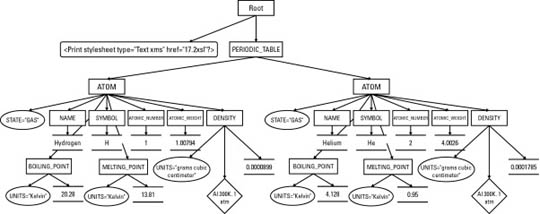
Figure 17-1 displays a tree diagram of this document. It begins at the top with the root node (not the same as the root element!)
which contains two child nodes, the xml-stylesheet processing instruction and the root element PERIODIC_TABLE. (The XML declaration is not visible to the XSLT processor and is not included in the tree the XSLT processor operates on.)
The PERIODIC_TABLE element contains two child nodes, both ATOM elements. Each ATOM element has an attribute node for its STATE attribute, and a variety of child element nodes. Each child element contains a node for its contents, as well as nodes for
any attributes, comments and processing instructions it possesses. Notice in particular that many nodes are something other
than elements. There are nodes for text, attributes, comments, namespaces and processing instructions. Unlike CSS, XSL is
not limited to working only with whole elements. It has a much more granular view of a document that enables you to base styles
on comments, attributes, processing instructions, element content, and more.
Note
Like the XML declaration, an internal DTD subset or DOCTYPE declaration is not part of the tree. However, it may have the
effect of adding attribute nodes to some elements through <!ATTLIST> declarations that use #FIXED or default attribute values.
Figure 17-1: Listing 17-1 as a tree diagram
XSLT operates by transforming one XML tree into another XML tree. More precisely, an XSLT processor accepts as input a tree represented as an XML document and produces as output a new tree, also represented as an XML document. Consequently, the transformation part of XSL is also called the tree construction part. The XSL transformation language contains operators for selecting nodes from the tree, reordering the nodes, and outputting nodes. If one of these nodes is an element node, then it may be an entire tree itself. Remember that all these operators, both for input and output, are designed for operation on a tree.
The input must be an XML document. You cannot use XSLT to transform from non-XML formats such as PDF, TeX, Microsoft Word, PostScript, MIDI, or others. HTML and SGML are borderline cases because they're so close to XML. XSLT can work with HTML and SGML documents that satisfy XML's well-formedness rules. However, XSLT cannot handle the wide variety of non-well-formed HTML and SGML that you encounter on most Web sites and document production systems. XSLT is not a general-purpose regular expression language for transforming arbitrary data.
Most of the time the output of an XSLT transformation is also an XML document. However, it can also be a result tree fragment that could be used as an external parsed entity in another XML document. (That is, it would be a well-formed XML document if it were enclosed in a single root element.) In other words, the output may not necessarily be a well-formed XML document, but it will at least be a plausible part of a well-formed XML document. An XSLT transformation cannot output text that is malformed XML such as
<B><I>Tag Mismatch!</B></I>
Tip
The xsl:output element and disable-output-escaping attribute discussed below loosen this restriction somewhat.
Most XSLT processors also support output as HTML and/or raw text, although the standard does not require them to do so. To
some extent this allows you to transform to non-XML formats like TeX, RTF, or PostScript. However XSLT is not designed to
make these transformations easy. It is designed for XML-to-XML transformations. If you need a non-XML output format, it will
probably be easier to use XSLT to transform the XML to an intermediate format like TeXML (http://www.alphaworks.ibm.com/tech/texml), and then use additional, non-XSLT software to transform that into the format you want.
An XSLT document contains template rules. A template rule has a pattern specifying the nodes it matches and a template to be instantiated and output when the pattern is matched. When an XSLT processor transforms an XML document using an XSL style sheet, it walks the XML document tree, looking at each node in turn. As each node in the XML document is read, the processor compares it with the pattern of each template rule in the style sheet. When the processor finds a node that matches a template rule's pattern, it outputs the rule's template. This template generally includes some markup, some new data, and some data copied out of the source XML document.
XSLT uses XML to describe these rules, templates, and patterns. The root element of the XSLT document is either a stylesheet or a transform element in the http://www.w3.org/1999/XSL/Transform namespace. By convention this namespace is mapped to the xsl prefix, but you're free to pick another prefix if you prefer. In this chapter, I always use the xsl prefix. From this point forward it should be understood that the prefix xsl is mapped to the http://www.w3.org/1999/XSL/Transform namespace.
Tip
If you get the namespace URI wrong, either by using a URI from an older draft of the specification, such as http://www.w3.org/TR/WD-xsl, or simply by making a typo in the normal URI, the XSLT processor will output the style sheet document itself instead of
the transformed input document. This is the result of the interaction between several obscure sections of the XSLT 1.0 specification.
The details aren’t important. What is important is that this very unusual behavior looks very much like a bug in the processor
if you aren’t familiar with it. If you are familiar with it, fixing it is trivial; just correct the namespace URI to http://www.w3.org/1999/XSL/Transform.
Each template rule is an xsl:template element. The pattern of the rule is placed in the match attribute of the xsl:template element. The output template is the content of the xsl:template element. All instructions in the template for doing things such as selecting parts of the input tree to include in the output
tree are performed by one or another XSLT elements. These are identified by the xsl: prefix on the element names. Elements that do not have an xsl: prefix are part of the result tree.
Listing 17-2 shows a very simple XSLT style sheet with two template rules. The first template rule matches the root element
PERIODIC_TABLE. It replaces this element with an html element. The contents of the html element are the results of applying the other templates in the document to the contents of the PERIODIC_TABLE element.
The second template matches ATOM elements. It replaces each ATOM element in the input document with a P element in the output document. The xsl:apply-templates rule inserts the text of the matched source element into the output document. Thus, the contents of a P element will be the text (but not the markup) contained in the corresponding ATOM element.
The xsl:stylesheet root element has two required attributes, version and xmlns:xsl, each of which must have exactly the values shown here (1.0 for version and http://www.w3.org/1999/XSL/Transform for xmlns:xsl). I'll discuss the exact syntax of all these elements and attributes below.
Listing 17-2: An XSLT style sheet for the periodic table with two template rules
<?xml version="1.0"?>
<xsl:stylesheet version="1.0"
          xmlns:xsl="http://www.w3.org/1999/XSL/Transform">
  <xsl:template match="PERIODIC_TABLE">
    <html>
      <xsl:apply-templates/>
    </html>
  </xsl:template>
  <xsl:template match="ATOM">
    <P>
      <xsl:apply-templates/>
    </P>
  </xsl:template>
</xsl:stylesheet>
The xsl:transform element can be used in place of xsl:stylesheet if you prefer. This is an exact synonym with the same syntax, semantics, and attributes. For example,
<?xml version="1.0"?>
<xsl:transform version="1.0"
         xmlns:xsl="http://www.w3.org/1999/XSL/Transform">
  <!-- templates go here -->
</xsl:transform>
In this book, I will stick to xsl:stylesheet.
There are three primary ways to transform XML documents into other formats, such as HTML, with an XSLT style sheet:
Each of these three approaches uses different software, although they all use the same XML documents and XSLT style sheets.
An ordinary Web server sending XML documents to Internet Explorer is an example of the first approach. A servlet-compatible
Web server using the IBM alphaWorks' XML Enabler (http://www.alphaworks.ibm.com/tech/xmlenabler) is an example of the second approach. A human using Michael Kay's command line SAXON program (http://users.iclway.co.uk/mhkay/saxon/) to transform XML documents to HTML documents, then placing the HTML documents on a Web server is an example of the third
approach. However, these all use (at least in theory) the same XSLT language.
In this chapter, I emphasize the third approach, primarily because at the time of this writing, specialized converter programs
such as Michael Kay's SAXON and the XML Apache Project's Xalan (http://xml.apache.org/xalan/) provide the most complete and accurate implementations of the XSLT specification. Furthermore, this approach offers the
broadest compatibility with legacy Web browsers and servers, whereas the first approach requires a more recent browser than
most users use, and the second approach requires special Web server software. In practice, though, requiring a different server
is not nearly as onerous as requiring a particular client. You, yourself, can install your own special server software; but
you cannot rely on your visitors to install particular client software.
On the CD-ROM
Xalan is on the CD-ROM in the directory utilities/xalan. SAXON is on the CD-ROM in the directory utilities/saxon.
Xalan is a Java 1.1 character mode application. To use it, you'll need a Java 1.1-compatible virtual machine such as Sun's
Java Development Kit (JDK), or Java Runtime Environment (JRE), Apple's Macintosh Runtime for Java 2.2 (MRJ), or Microsoft's
virtual machine. You'll need to set your CLASSPATH environment variable to include both the xalan.jar and xerces.jar files (both included in the Xalan distribution). On Unix/Linux
you can set this in your .cshrc file if you use csh or tcsh or in your .profile file if you use sh, ksh or bash. On Windows
95/98 you can set it in AUTOEXEC.BAT. In Windows NT/2000, set it with the System Control Panel Environment tab.
Tip
If you're using the JRE 1.2 or later, you can just put the xalan.jar and xerces.jar files in your jre/lib/ext directory instead
of mucking around with the CLASSPATH environment variable. If you've installed the JDK instead of the JRE on Windows, you may have two jre/lib/ext directories,
one somewhere like C:\jdk1.3\jre\lib\ext and the other somewhere like C:\Program Files\Javasoft\jre\1.3\lib\ext. You need
to copy the jar archive into both ext directories. Putting one copy in one directory and an alias into the other directory
does not work. You must place complete, actual copies into each ext directory.
Note
Although I primarily use Xalan in this chapter, the examples should work with SAXON or any other XSLT processor that implements the November 16, 1999 XSLT 1.0 recommendation.
The Java class containing the main method for Xalan is org.apache.xalan.xslt.Process. You can run Xalan by typing the following at the shell prompt or in a DOS window:
C:\> java org.apache.xalan.xslt.Process -in 17-1.xml -xsl 17-2.xsl -out 17-3.html
This line runs the java interpreter on the Java class containing the Xalan program's main() method, org.apache.xalan.xslt.Process. The source XML document following the -in flag is 17-1.xml. The XSLT style sheet follows the -xsl flag and is 17-2.xsl here;
and the output HTML file follows the -out argument and is named 17-3.html. If the -out argument is omitted, the transformed
document will be printed on the console. If the -xsl argument is omitted, Xalan will attempt to use the style sheet named
by the xml-stylesheet processing instruction in the prolog of the input XML document.
Listing 17-2 transforms input documents to well-formed HTML files as discussed in Chapter 6. However, you can transform from any XML application to any other as long as you can write a style sheet to support the transformation. For example, you can imagine a style sheet that transforms from Vector Markup Language (VML) documents to Scalable Vector Graphics (SVG) documents:
% java org.apache.xalan.xslt.Process -in pinktriangle.vml
  -xsl VmlToSVG.xsl -out pinktriangle.svg
Most other command line XSLT processors behave similarly, though of course they'll have different command line arguments and
options. They may prove slightly easier to use if they're not written in Java since there won't be any need to configure the
CLASSPATH.
Tip
If you're using Windows, you can use a stand-alone executable version of SAXON called Instant SAXON (http://users.iclway.co.uk/mhkay/saxon/instant.html) instead. This is a little easier to use because it doesn't require you to mess around with CLASSPATH environment variables. To transform a document with this program, simply place the saxon.exe file in your path and type:
C:\> saxon -o 17-3.html 17-1.xml 17-2.xsl
Listing 17-3 shows the output of running Listing 17-1 through Xalan with the XSLT style sheet in Listing 17-2. Notice that Xalan does not attempt to clean up the HTML it generates, which has a lot of white space. This is not important since ultimately you want to view the file in a Web browser that trims white space. Figure 17-2 shows Listing 17-3 loaded into Netscape Navigator 4.6. Because Listing 17-3 is standard HTML, you don't need an XML-capable browser to view it.
Listing 17-3: The HTML produced by applying the style sheet in Listing 17-2 to the XML in Listing 17-1
<html>
  <P>
    Hydrogen
    H
    1
    1.00794
    20.28
    13.81
      0.0000899
  </P>
  <P>
    Helium
    He
    2
    4.0026
    4.216
    0.95
      0.0001785
  </P>
</html>
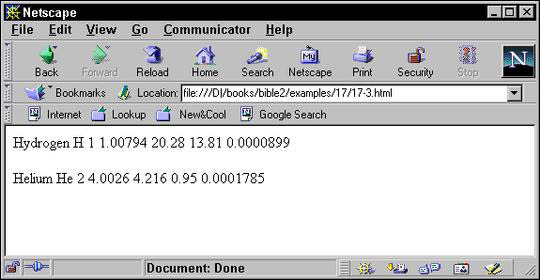
Figure 17-2: The page produced by applying the style sheet in Listing 17-2 to the XML document in Listing 17-1.
Instead of preprocessing the XML file, you can send the client both the XML file and the XSLT file that describes how to render it. The client is responsible for applying the style sheet to the document and rendering it accordingly. This is more work for the client, but places much less load on the server. In this case, the XSLT style sheet must transform the document into an XML application the client understands. HTML is a likely choice, though in the future some browsers may understand XSL formatting objects as well.
Attaching an XSLT style sheet to an XML document is easy. Simply insert an xml-stylesheet processing instruction in the prolog immediately after the XML declaration. This processing instruction should have a type attribute with the value text/xml and an href attribute whose value is a URL pointing to the style sheet. For example:
<?xml version="1.0"?>
<?xml-stylesheet type="text/xml" href="17-2.xsl"?>
This is also how you attach a CSS style sheet to a document. The only difference here is that the type attribute has the value text/xml instead of text/css.
Note
In the future the more specific MIME media type application/xslt+xml will be available to distinguish XSLT documents from all other XML documents. Once XSLT processors are revised to support
this, you will be able to write the xml-stylesheet processing instruction like this instead:
<?xml-stylesheet type="application/xslt+xml" href="17-2.xsl"?>
Internet Explorer 5.0 and 5.5's XSLT support differs from the November 16, 1999 recommendation in several ways. First, it
expects that XSLT elements live in the http://www.w3.org/TR/WD-xsl namespace instead of the http://www.w3.org/1999/XSL/Transform namespace, although the xsl prefix is still used. Second, it expects the non-standard MIME type text/xsl in the xml-stylesheet processing instruction rather than text/xml. Finally, it does not implement the default rules for elements that match no template. Consequently, you need to provide
a template for each element in the hierarchy starting from the root before trying to view a document in Internet Explorer.
Listing 17-4 demonstrates. The three rules match the root node, the root element PERIODIC_TABLE, and the ATOM elements in that order. Figure 17-3 shows the XML document in Listing 17-1 loaded into Internet Explorer 5.5 with this style
sheet.
Listing 17-4: The style sheet of Listing 17-2 adjusted to work with Internet Explorer 5.0 and 5.5
<?xml version="1.0"?>
<!-- This is a non-standard style sheet designed just for
     Internet Explorer. It will not work with any standards
     compliant XSLT processor. -->
<xsl:stylesheet version="1.0"
  xmlns:xsl="http://www.w3.org/TR/WD-xsl">
  <xsl:template match="/">
    <html>
      <xsl:apply-templates/>
    </html>
  </xsl:template>
  <xsl:template match="PERIODIC_TABLE">
    <xsl:apply-templates/>
  </xsl:template>
  <xsl:template match="ATOM">
    <P>
      <xsl:value-of select="."/>
    </P>
  </xsl:template>
</xsl:stylesheet>
Caution
Ideally, you would use the same XML document both for direct display and for prerendering to HTML. Unfortunately, that would require Microsoft to actually support the real XSLT specification. Microsoft has repeatedly promised to support this, and they have just as repeatedly reneged on those promises.
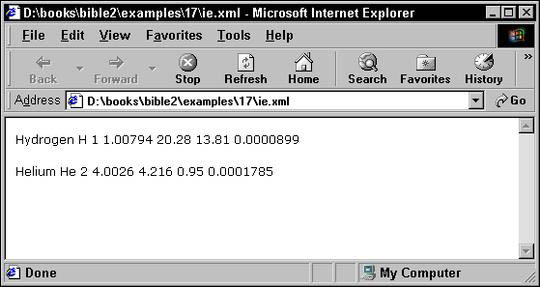
Figure 17-3: The page produced in Internet Explorer 5.5 by applying the style sheet in Listing 17-4 to the XML document in Listing 17-1.
Internet Explorer also fails to support many other parts of standard XSLT, while offering a number of nonstandard extensions.
If you've successfully installed MSXML3 in replace mode, then IE5 can handle most of XSLT 1.0 including the http://www.w3.org/1999/XSL/Transform namespace. However, even this version still has a few bugs, including expecting the text/xsl MIME type instead of text/xml.
In the rest of this chapter, I use only standard XSLT and simply prerender the file in HTML before loading it into a Web browser.
If you find something in this chapter doesn’t work in Internet Explorer, please complain to Microsoft, not to me.
Template rules defined by xsl:template elements are the most important part of an XSLT style sheet. These associate particular output with particular input. Each
xsl:template element has a match attribute that specifies which nodes of the input document the template is instantiated for.
The content of the xsl:template element is the actual template to be instantiated. A template may contain both text that will appear literally in the output
document and XSLT instructions that copy data from the input XML document to the result. Because all XSLT instructions are
in the http://www.w3.org/1999/XSL/Transform namespace, it's easy to distinguish between the elements that are literal data to be copied to the output and instructions.
For example, here is a template that is applied to the root node of the input tree:
<xsl:template match="/">
  <html>
    <head>
    </head>
    <body>
    </body>
  </html>
</xsl:template>
When the XSLT processor reads the input document, the first node it sees is the root. This rule matches that root node, and tells the XSLT processor to emit this text:
<html>
  <head>
  </head>
  <body>
  </body>
</html>
This text is well-formed HTML. Because the XSLT document is itself an XML document, its contents — templates included — must be well-formed XML.
If you were to use the above rule, and only the above rule, in an XSLT style sheet, the output would be limited to the above six tags. That's because no instructions in the rule tell the formatter to move down the tree and look for further matches against the templates in the style sheet.
To get beyond the root, you have to tell the formatting engine to process the children of the root. In general, to include
content in the child nodes, you have to recursively process the nodes through the XML document. The element that does this
is xsl:apply-templates. By including xsl:apply-templates in the output template, you tell the formatter to compare each child element of the matched source element against the templates
in the style sheet, and, if a match is found, output the template for the matched node. The template for the matched node
may itself contain xsl:apply-templates elements to search for matches for its children. When the formatting engine processes a node, the node is treated as a complete
tree. This is the advantage of the tree structure. Each part can be treated the same way as the whole. For example, Listing
17-5 is an XSLT style sheet that uses the xsl:apply templates element to process the child nodes.
Listing 17-5: An XSLT style sheet that recursively processes the children of the root
<?xml version="1.0"?>
<xsl:stylesheet version="1.0"
  xmlns:xsl="http://www.w3.org/1999/XSL/Transform">
  <xsl:template match="/">
    <html>
      <xsl:apply-templates/>
    </html>
  </xsl:template>
  <xsl:template match="PERIODIC_TABLE">
    <body>
      <xsl:apply-templates/>
    </body>
  </xsl:template>
  <xsl:template match="ATOM">
    An Atom
  </xsl:template>
</xsl:stylesheet>
When this style sheet is applied to Listing 17-1, here's what happens:
<html> tag is written out.
xsl:apply-templates element causes the formatting engine to process the child nodes of the root node of the input document.
A. The first child of the root, the xml-stylesheet processing instruction, is compared with the template rules. It doesn't match any of them, so no output is generated.
B. The second child of the root node of the input document, the root element PERIODIC_TABLE, is compared with the template rules. It matches the second template rule.
C. The <body> tag is written out.
D. The xsl:apply-templates element in the body element causes the formatting engine to process the child nodes of PERIODIC_TABLE.
a. The first child of the PERIODIC_TABLE element, that is the Hydrogen ATOM element, is compared with the template rules. It matches the third template rule.
b. The text "An Atom" is output.
c. The second child of the PERIODIC_TABLE element, that is the Helium ATOM element, is compared with the template rules. It matches the third template rule.
d. The text "An Atom" is output.
E. The </body> tag is written out.
</html> tag is written out.
The end result is:
<html>
<body>
    An Atom
    An Atom
</body>
</html>
To replace the text "An Atom" with the name of the ATOM element as given by its NAME child, you need to specify that templates should be applied to the NAME children of the ATOM element. To choose a particular set of children instead of all children you supply xsl:apply-templates with a select attribute designating the children to be selected. For example:
<xsl:template match="ATOM">
  <xsl:apply-templates select="NAME"/>
</xsl:template>
The select attribute uses the same kind of patterns as the match attribute of the xsl:template element. For now, I'll stick to simple names of elements; but in the section on patterns for matching and selecting later
in this chapter, you'll see many more possibilities for both select and match. If no select attribute is present, all child element, text, comment, and processing instruction nodes are selected. (Attribute and namespace
nodes are not selected.)
The result of adding this rule to the style sheet of Listing 17-5 and applying it to Listing 17-1 is this:
<html>
<body>
  Hydrogen
  Helium
</body>
</html>
The xsl:value-of element computes the value of something (most of the time, though not always, something in the input document) and copies
it into the output document. The select attribute of the xsl:value-of element specifies exactly which something's value is being computed.
For example, suppose you want to replace the literal text An Atom with the name of the ATOM element as given by the contents of its NAME child. You can replace An Atom with <xsl:value-of select="NAME"/> like this:
<xsl:template match="ATOM">
  <xsl:value-of select="NAME"/>
</xsl:template>
Then, when you apply the style sheet to Listing 17-1, this text is generated:
<html>
<body>
  Hydrogen
  Helium
</body>
</html>
The item whose value is selected, the NAME element in this example, is relative to the current node. The current node is the item matched by the template, the particular
ATOM element in this example. Thus, when the Hydrogen ATOM is matched by <xsl:template match="ATOM">, the Hydrogen ATOM's NAME is selected by xsl:value-of. When the Helium ATOM is matched by <xsl:template match="ATOM">, the Helium ATOM's NAME is selected by xsl:value-of.
The value of a node is always a string, possibly an empty string. The exact contents of this string depend on the type of
the node. The most common type of node is element, and the value of an element node is particularly simple. It's the concatenation
of all the character data (but not markup!) between the element's start tag and end tag. For example, the first ATOM element in Listing 17-1 is as follows:
  <ATOM STATE="GAS">
    <NAME>Hydrogen</NAME>
    <SYMBOL>H</SYMBOL>
    <ATOMIC_NUMBER>1</ATOMIC_NUMBER>
    <ATOMIC_WEIGHT>1.00794</ATOMIC_WEIGHT>
    <BOILING_POINT UNITS="Kelvin">20.28</BOILING_POINT>
    <MELTING_POINT UNITS="Kelvin">13.81</MELTING_POINT>
    <DENSITY UNITS="grams/cubic centimeter">
      <!-- At 300K, 1 atm -->
      0.0000899
    </DENSITY>
  </ATOM>
The value of this element is shown below:
  Hydrogen
  H
  1
  1.00794
  1
  20.28
  13.81
    0.0000899
I calculated this value by stripping out all the tags and comments. Everything else including white space was left intact. The values of the other six node types are calculated similarly, mostly in obvious ways. Table 17-1 summarizes.
Table 17-1: Values of Nodes
|
Node Type: |
Value: |
|
Root |
The value of the root element |
|
Element |
The concatenation of all parsed character data contained in the element, including character data in any of the descendants of the element |
|
Text |
The text of the node; essentially the node itself |
|
Attribute |
The normalized attribute value as specified by Section 3.3.3 of the XML 1.0 recommendation; basically the attribute value after entities are resolved and leading and trailing white space is stripped; does not include the name of the attribute, the equals sign, or the quotation marks |
|
Namespace |
The URI of the namespace |
|
Processing instruction |
The data in the processing instruction; does not include the processing instruction , |
|
Comment |
The text of the comment, |
The xsl:value-of element should only be used in contexts where it is obvious which node's value is being taken. If there are multiple possible
items that could be selected, then only the first one will be chosen. For instance, this is a poor rule because a typical
PERIODIC_TABLE element contains more than one ATOM:
<xsl:template match="PERIODIC_TABLE">
  <xsl:value-of select="ATOM"/>
</xsl:template>
There are two ways of processing multiple elements in turn. The first method you've already seen. Simply use xsl:apply-templates with a select attribute that chooses the particular elements that you want to include, like this:
  <xsl:template match="PERIODIC_TABLE">
    <xsl:apply-templates select="ATOM"/>
  </xsl:template>
  <xsl:template match="ATOM">
    <xsl:value-of select="."/>
  </xsl:template>
The select="." in the second template tells the formatter to take the value of the matched element, ATOM in this example.
The second option is xsl:for-each. The xsl:for-each element processes each element chosen by its select attribute in turn. However, no additional template is required. For example:
<xsl:template match="PERIODIC_TABLE">
  <xsl:for-each select="ATOM">
    <xsl:value-of select="."/>
  </xsl:for-each>
</xsl:template>
The match attribute of the xsl:template element supports a complex syntax that allows you to express exactly which nodes you do and do not want to match. The select attribute of xsl:apply-templates, xsl:value-of, xsl:for-each, xsl:copy-of, and xsl:sort supports an even more powerful superset of this syntax called Xpath that allows you to express exactly which nodes you do
and do not want to select. Various patterns for matching and selecting nodes are discussed below.
In order that the output document be well-formed, the first thing output from an XSL transformation should be the output document's
root element. Consequently, XSLT style sheets generally start with a rule that applies to the root node. To specify the root
node in a rule, you give its match attribute the value "/". For example:
<xsl:template match="/">
  <DOCUMENT>
    <xsl:apply-templates/>
  </DOCUMENT>
</xsl:template>
This rule applies to the root node and only the root node of the input tree. When the root node is read, the tag <DOCUMENT> is output, the children of the root node are processed, then the </DOCUMENT> tag is output. This rule overrides the default rule for the root node. Listing 17-6 shows a style sheet with a single rule
that applies to the root node.
Listing 17-6: An XSLT style sheet with one rule for the root node
<?xml version="1.0"?>
<xsl:stylesheet version="1.0"
  xmlns:xsl="http://www.w3.org/1999/XSL/Transform">
    <xsl:template match="/">
      <html>
        <head>
          <title>Atomic Number vs. Atomic Weight</title>
        </head>
        <body>
          <table>
            Atom data will go here
          </table>
        </body>
      </html>
    </xsl:template>
</xsl:stylesheet>
Because this style sheet only provides a rule for the root node, and because that rule's template does not specify any further processing of child nodes, only literal output that's included in the template is inserted in the resulting document. In other words, the result of applying the style sheet in Listing 17-6 to Listing 17-1 (or any other well-formed XML document) is this:
<html>
<head>
<title>Atomic Number vs. Atomic Weight</title>
</head>
<body>
<table>
            Atom data will go here
          </table>
</body>
</html>
As previously mentioned, the most basic pattern contains a single element name that matches all elements with that name. For
example, this template matches ATOM elements and makes their ATOMIC_NUMBER children bold:
<xsl:template match="ATOM">
  <b><xsl:value-of select="ATOMIC_NUMBER"/></b>
</xsl:template>
Listing 17-7 demonstrates a style sheet that expands on Listing 17-6. First, an xsl:apply-templates element is included in the template rule for the root node. This rule uses a select attribute to ensure that only PERIODIC_TABLE elements are processed.
Second, a rule that only applies to PERIODIC_TABLE elements is created using match="PERIODIC_TABLE". This rule sets up the header for the table, and then applies templates to form the body of the table from ATOM elements.
Finally, the ATOM rule specifically selects the ATOM element's NAME, ATOMIC_NUMBER, and ATOMIC_WEIGHT child elements with <xsl:value-of select="NAME"/>, <xsl:value-of select="ATOMIC_NUMBER"/>, and <xsl:value-of select="ATOMIC_WEIGHT"/>. These are wrapped up inside HTML's tr and td elements, so that the end result is a table of atomic numbers matched to atomic weights. Figure 17-4 shows the output of
applying the style sheet in Listing 17-7 to the complete periodic table document displayed in Netscape Navigator.
One thing you may wish to note about this style sheet: The exact order of the NAME, ATOMIC_NUMBER, and ATOMIC_WEIGHT elements in the input document is irrelevant. They appear in the output in the order they were selected; that is, first number,
then weight. Conversely, the individual atoms are sorted in alphabetical order as they appear in the input document. Later,
you'll see how to use an xsl:sort element to change that so you can arrange the atoms in the more conventional atomic number order.
Listing 17-7: Templates applied to specific classes of element with select
<?xml version="1.0"?>
<xsl:stylesheet version="1.0"
  xmlns:xsl="http://www.w3.org/1999/XSL/Transform">
    <xsl:template match="/">
      <html>
        <head>
          <title>Atomic Number vs. Atomic Weight</title>
        </head>
        <body>
          <xsl:apply-templates select="PERIODIC_TABLE"/>
        </body>
      </html>
    </xsl:template>
    <xsl:template match="PERIODIC_TABLE">
      <h1>Atomic Number vs. Atomic Weight</h1>
      <table>
        <th>Element</th>
        <th>Atomic Number</th>
        <th>Atomic Weight</th>
          <xsl:apply-templates select="ATOM"/>
      </table>
    </xsl:template>
    <xsl:template match="ATOM">
      <tr>
        <td><xsl:value-of select="NAME"/></td>
        <td><xsl:value-of select="ATOMIC_NUMBER"/></td>
        <td><xsl:value-of select="ATOMIC_WEIGHT"/></td>
      </tr>
    </xsl:template>
</xsl:stylesheet>
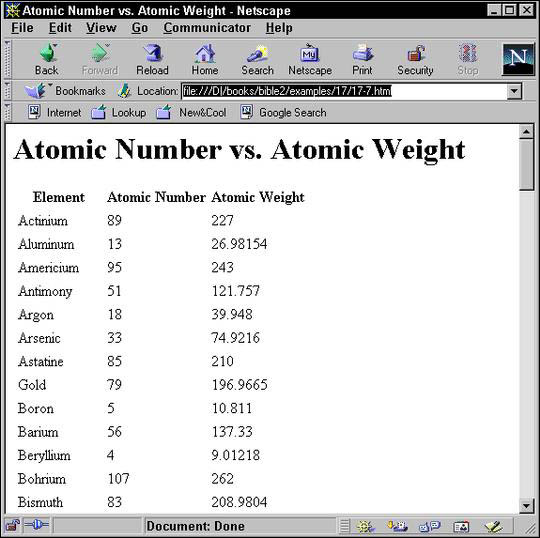
Figure 17-4: A table showing atomic number versus atomic weight in Netscape Navigator
Sometimes you want a single template to apply to more than one element. You can indicate that a template matches all elements
by using the asterisk wildcard (*) in place of an element name in the match attribute. For example this template says that all elements should be wrapped in a P element:
    <xsl:template match="*">
      <P>
        <xsl:value-of select="."/>
      </P>
    </xsl:template>
Of course this is probably more than you want. You’d like to use the template rules already defined for PERIODIC_TABLE and ATOM elements as well as the root node and only use this rule for the other elements. Fortunately you can. In the event that two
rules both match a single node, then by default the more specific one takes precedence. In this case that means that ATOM elements will use the template with match="ATOM" instead of a template that merely has match="*". However, NAME, BOILING_POINT, ATOMIC_NUMBER and other elements that don’t match a more specific template will cause the match="*" template to activate.
You can place a namespace prefix in front of the asterisk to indicate that only elements in a particular namespace should
be matched. For example this template matches all SVG elements, presuming that the prefix svg is mapped to the normal SVG URI http://www.w3.org/2000/svg in the style sheet.
    <xsl:template match="svg:*">
      <DIV>
        <xsl:value-of select="."/>
      </DIV>
    </xsl:template>
Of course in Listing 17-1, there aren't any elements from this namespace, so this template wouldn’t produce any output. However, it might when applied to a different document that did include some SVG.
You're not limited to the children of the current node in match attributes. You can use the / symbol to match specified hierarchies of elements. Used alone, the / symbol refers to the root node. However, you can use it between two names to indicate that the second is the child of the
first. For example, ATOM/NAME refers to NAME elements that are children of ATOM elements.
In xsl:template elements, this enables you to match only some of the elements of a given kind. For example, this template rule marks SYMBOL elements that are children of ATOM elements strong. It does nothing to SYMBOL elements that are not direct children of ATOM elements.
<xsl:template match="ATOM/SYMBOL">
  <strong><xsl:value-of select="."/></strong>
</xsl:template>
Caution
Remember that this rule selects SYMBOL elements that are children of ATOM elements, not ATOM elements that have SYMBOL children. In other words, the . in <xsl:value-of select="."/> refers to the SYMBOL and not to the ATOM.
You can specify deeper matches by stringing patterns together. For example, PERIODIC_TABLE/ATOM/NAME selects NAME elements whose parent is an ATOM element whose parent is a PERIODIC_TABLE element.
You can also use the * wild card to substitute for an arbitrary element name in a hierarchy. For example, this template rule applies to all SYMBOL elements that are grandchildren of a PERIODIC_TABLE element.
<xsl:template match="PERIODIC_TABLE/*/SYMBOL">
  <strong><xsl:value-of select="."/></strong>
</xsl:template>
Finally, as you saw above, a / by itself selects the root node of the document. For example, this rule applies to all PERIODIC_TABLE elements that are root elements of the document:
<xsl:template match="/PERIODIC_TABLE">
  <html><xsl:apply-templates/></html>
</xsl:template>
While / refers to the root node, /* refers to the root element, whatever it is. For example, this template doesn't care whether the root element is PERIODIC_TABLE, DOCUMENT, or SCHENECTADY. It produces the same output in all cases.
<xsl:template match="/*">
  <html>
    <head>
      <title>Atomic Number vs. Atomic Weight</title>
    </head>
    <body>
      <xsl:apply-templates/>
    </body>
  </html>
</xsl:template>
Sometimes, especially with an uneven hierarchy, you may find it easier to bypass intermediate nodes and simply select all
the elements of a given type, whether they're immediate children, grandchildren, great-grandchildren, or what have you. The
double slash, //, refers to a descendant element at an arbitrary level. For example, this template rule applies to all NAME descendants of PERIODIC_TABLE, no matter how deep:
<xsl:template match="PERIODIC_TABLE//NAME">
  <i><xsl:value-of select="."/></i>
</xsl:template>
The periodic table example is fairly shallow, but this trick becomes more important in deeper hierarchies, especially when
an element can contain other elements of its type (for example, an ATOM contains an ATOM).
The // operator at the beginning of a pattern selects any descendant of the root node. For example, this template rule processes
all ATOMIC_NUMBER elements while completely ignoring their location:
<xsl:template match="//ATOMIC_NUMBER">
  <i><xsl:value-of select="."/></i>
</xsl:template>
You may want to apply a particular style to a particular single element without changing all other elements of that type.
The simplest way to do that in XSLT is to attach a style to the element's ID type attribute. This is done with the id() selector, which contains the ID value in single quotes. For example, this rule makes the element with the ID e47 bold:
<xsl:template match="id('e47')">
  <b><xsl:value-of select="."/></b>
</xsl:template>
This assumes, of course, that the elements that you want to select in this fashion have an attribute declared as type ID in the source document's DTD. This may not be the case, however. For one thing, many documents do not have DTDs. They're
merely well-formed, not valid. And even if they have a DTD, there's no guarantee that any element has an ID type attribute.
Cross-Reference
ID-type attributes are not simply attributes with the name ID. ID type attributes are discussed in Chapter 11.
As you saw in Chapter 5, the @ sign matches against attributes and selects nodes according to attribute names. Simply prefix the name of the attribute that
you want to select with the @ sign. For example, this template rule matches UNITS attributes, and wraps them in an I element.
    <xsl:template match="@UNITS">
      <I><xsl:value-of select="."/></I>
    </xsl:template>
However, merely adding this rule to the style sheet will not automatically produce italicized units in the output because
attributes are not children of the elements that contain them. Therefore by default when an XSLT processor is walking the
tree it does not see attribute nodes. You have to explicitly process them using xsl:apply-templates with an appropriate select attribute. Listing 17-8 demonstrates with a style sheet that outputs a table of atomic numbers versus melting points. Not
only is the value of the MELTING_POINT element written out, so is the value of its UNITS attribute. This is selected by <xsl:apply-templates select="@UNITS"/> in the template rule for MELTING_POINT elements.
Listing 17-8: An XSLT style sheet that selects the UNITS attribute with @
<?xml version="1.0"?>
<xsl:stylesheet version="1.0"
  xmlns:xsl="http://www.w3.org/1999/XSL/Transform">
    <xsl:template match="/PERIODIC_TABLE">
      <html>
        <body>
          <h1>Atomic Number vs. Melting Point</h1>
          <table>
            <th>Element</th>
            <th>Atomic Number</th>
            <th>Melting Point</th>
            <xsl:apply-templates/>
          </table>
        </body>
      </html>
    </xsl:template>
    <xsl:template match="ATOM">
       <tr>
        <td><xsl:value-of select="NAME"/></td>
        <td><xsl:value-of select="ATOMIC_NUMBER"/></td>
        <td><xsl:apply-templates select="MELTING_POINT"/></td>
      </tr>
    </xsl:template>
    <xsl:template match="MELTING_POINT">
      <xsl:value-of select="."/>
      <xsl:apply-templates select="@UNITS"/>
    </xsl:template>
    <xsl:template match="@UNITS">
      <I><xsl:value-of select="."/></I>
    </xsl:template>
</xsl:stylesheet>
Recall that the value of an attribute node is simply the normalized string value of the attribute. Once you apply the style
sheet in Listing 17-8, ATOM elements come out formatted like this:
  <tr>
<td>Hydrogen</td><td>1</td><td>13.81<I>Kelvin</I></td>
</tr>
  <tr>
<td>Helium</td><td>2</td><td>0.95<I>Kelvin</I></td>
</tr>
You can combine attributes with elements using the various hierarchy operators. For example, the pattern BOILING_POINT/@UNITS refers to the UNITS attribute of a BOILING_POINT element. ATOM/*/@UNITS matches any UNITS attribute of a child element of an ATOM element. This is especially helpful when matching against attributes in template rules. You must remember that what's being
matched is the attribute node, not the element that contains it. It's a very common mistake to implicitly confuse the attribute
node with the element node that contains it. For example, consider this rule, which attempts to apply templates to all child
elements that have UNITS attributes:
<xsl:template match="ATOM">
  <xsl:apply-templates select="@UNITS"/>
</xsl:template>
What it actually does is apply templates to the nonexistent UNITS attributes of ATOM elements.
You can also use the @* wild card to match all attributes of an element, for example BOILING_POINT/@* to match all attributes of BOILING_POINT elements. You can also add a namespace prefix after the @ to match all attributes in a declared namespace. For instance, @xlink:* matches all the XLink attributes, such as xlink:show, xlink:type, and xlink:href, assuming the xlink prefix is mapped to the http://www.w3.org/1999/xlink XLink namespace URI.
Most of the time you should simply ignore comments in XML documents. Making comments an essential part of a document is a very bad idea. Nonetheless, XSLT does provide a means to match a comment if you absolutely have to.
To match a comment, use the comment() pattern. Although this pattern has function-like parentheses, it never actually takes any arguments. For example, this template
rule italicizes all comments:
    <xsl:template match="comment()">
      <i><xsl:value-of select="."/></i>
    </xsl:template>
To distinguish between different comments, you have to look at the comments' parent and ancestors. For example, recall that
a DENSITY element looks like this:
    <DENSITY UNITS="grams/cubic centimeter">
      <!-- At 300K, 1 atm -->
      0.0000899
    </DENSITY>
You can use the hierarchy operators to select particular comments. For example, this rule only matches comments that occur
inside DENSITY elements:
<xsl:template match="DENSITY/comment()">
  <i><xsl:value-of select="."/></i>
</xsl:template>
The only reason Listing 17-1 uses a comment to specify conditions instead of an attribute or element is precisely for this
example. In practice, you should never put important information in comments. The real reason XSLT allows you to select comments
is so that a style sheet can transform from one XML application to another while leaving the comments intact. Any other use
indicates a poorly designed original document. The following rule matches all comments, and copies them back out again using
the xsl:comment element.
<xsl:template match="comment()">
  <xsl:comment><xsl:value-of select="."/></xsl:comment>
</xsl:template>
When it comes to writing structured, intelligible, maintainable XML, processing instructions aren't much better than comments. However, there are occasional genuine needs for them, including attaching style sheets to documents.
The processing-instruction() function matches processing instructions. The argument to processing-instruction() is a quoted string giving the target of the processing instruction to select. If you do not include an argument, the first
processing instruction child of the current node is matched. For example, this rule matches the processing instruction children
of the root node (most likely the xml-stylesheet processing instruction). The xsl:processing-instruction element inserts a processing instruction with the specified name and value in the output document.
<xsl:template match="/processing-instruction()">
  <xsl:processing-instruction name="xml-stylesheet">
    type="text/xml" value="auto.xsl"
  </xsl:processing-instruction>
</xsl:template>
This rule also matches the xml-stylesheet processing instruction, but by its name:
<xsl:template
  match="processing-instruction('xml-stylesheet')">
  <xsl:processing-instruction name="xml-stylesheet">
    <xsl:value-of select="."/>
  </xsl:processing-instruction>
</xsl:template>
In fact, one of the primary reasons for distinguishing between the root element and the root node is so that processing instructions
from the prolog can be read and processed. Although the xml-stylesheet processing instruction uses a name = value syntax, XSL does not consider these to be attributes because processing instructions
are not elements. The value of a processing instruction is simply everything between the white space following its name and
the closing ?>.
Text nodes are generally ignored as nodes, although their values are included as part of the value of a selected element.
However, the text() operator does enable you to specifically select the text child of an element. Despite the parentheses, this operator takes
no arguments. For example, this rule emboldens all text:
<xsl:template match="text()">
  <b><xsl:value-of select="."/></b>
</xsl:template>
The main reason this operator exists is for the default rules. XSLT processors must provide the following default rule whether the author specifies it or not:
<xsl:template match="text()">
  <xsl:value-of select="."/>
</xsl:template>
This means that whenever a template is applied to a text node, the text of the node is output. If you do not want the default behavior, you can override it. For example, including the following empty template rule in your style sheet will prevent text nodes from being output unless specifically matched by another rule.
<xsl:template match="text()">
</xsl:template>
The vertical bar (|)allows a template rule to match multiple patterns. If a node matches one pattern or the other, it will activate the template.
For example, this template rule matches both ATOMIC_NUMBER and ATOMIC_WEIGHT elements:
<xsl:template match="ATOMIC_NUMBER|ATOMIC_WEIGHT">
  <B><xsl:apply-templates/></B>
</xsl:template>
You can include white space around the | if that makes the code clearer. For example,
<xsl:template match="ATOMIC_NUMBER | ATOMIC_WEIGHT">
  <B><xsl:apply-templates/></B>
</xsl:template>
You can also use more than two patterns in sequence. For example, this template rule applies to ATOMIC_NUMBER, ATOMIC_WEIGHT, and SYMBOL elements (that is, it matches ATOMIC_NUMBER, ATOMIC_WEIGHT and SYMBOL elements):
<xsl:template match="ATOMIC_NUMBER | ATOMIC_WEIGHT | SYMBOL">
  <B><xsl:apply-templates/></B>
</xsl:template>
The / operator is evaluated before the | operator. Thus, the following template rule matches an ATOMIC_NUMBER child of an ATOM, or an ATOMIC_WEIGHT of unspecified parentage, not an ATOMIC_NUMBER child of an ATOM or an ATOMIC_WEIGHT child of an ATOM.
<xsl:template match="ATOM/ATOMIC_NUMBER|ATOMIC_WEIGHT">
  <B><xsl:apply-templates/></B>
</xsl:template>
So far, I've merely tested for the presence of various nodes. However, you can test for more details about the nodes that
match a pattern using []. You can perform many different tests including:
For example, seaborgium, element 106, has only been created in microscopic quantities. Even its most long-lived isotope has
a half-life of only 30 seconds. With such a hard-to-create, short-lived element, it's virtually impossible to measure the
density, melting point, and other bulk properties. Consequently, the periodic table document omits the elements describing
the bulk properties of seaborgium and similar atoms because the data simply doesn’t exist. If you want to create a table of
atomic number versus melting point, you should omit those elements with unknown melting points. To do this, you can provide
one template for ATOM elements that have MELTING_POINT children and another one for elements that don't, like this:
<!-- Include nothing for arbitrary atoms -->
<xsl:template match="ATOM" />
<!-- Include a table row for atoms that do have
     melting points. This rule will override the
     previous one for those atoms that do have
     melting points. -->
<xsl:template match="ATOM[MELTING_POINT]">
  <tr>
    <td><xsl:value-of select="NAME"/></td>
    <td><xsl:value-of select="MELTING_POINT"/></td>
  </tr>
</xsl:template>
Note here, that it is the ATOM element being matched, not the MELTING_POINT element as in the case of ATOM/MELTING_POINT.
The test brackets can contain more than simply a child-element name. In fact, they can contain any XPath expression. (XPath
expressions are a superset of match patterns that are discussed in the next section.) If the specified element has a child
matching that expression, it is considered to match the total pattern. For example, this template rule matches ATOM elements with NAME or SYMBOL children.
<xsl:template match="ATOM[NAME | SYMBOL]">
</xsl:template>
This template rule matches ATOM elements with a DENSITY child element that has a UNITS attribute:
<xsl:template match="ATOM[DENSITY/@UNITS]">
</xsl:template>
To revisit an earlier example, to correctly find all child elements that have UNITS attributes, use * to find all elements and [@UNITS] to winnow those down to the ones with UNITS attributes, like this:
<xsl:template match="ATOM">
  <xsl:apply-templates select="*[@UNITS]"/>
</xsl:template>
One type of pattern testing that proves especially useful is string equality. An equals sign (=) can test whether the value of a node identically matches a given string. For example, this template finds the ATOM element that contains an ATOMIC_NUMBER element whose content is the string 10 (Neon).
<xsl:template match="ATOM[ATOMIC_NUMBER='10']">
  This is Neon!
</xsl:template>
Testing against element content may seem extremely tricky because of the need to get the value exactly right, including white
space. You may find it easier to test against attribute values since those are less likely to contain insignificant white
space. For example, the style sheet in Listing 17-9 applies templates only to those ATOM elements whose STATE attribute value is the three letters GAS.
Listing 17-9: An XSLT style sheet that selects only those ATOM elements whose STATE attribute has the value GAS
<?xml version="1.0"?>
<xsl:stylesheet version="1.0"
  xmlns:xsl="http://www.w3.org/1999/XSL/Transform">
  <xsl:template match="PERIODIC_TABLE">
    <html>
      <head><title>Gases</title></head>
      <body>
        <xsl:apply-templates/>
      </body>
    </html>
  </xsl:template>
  <xsl:template match="ATOM"/>
  <xsl:template match="ATOM[@STATE='GAS']">
    <P><xsl:value-of select="."/></P>
  </xsl:template>
</xsl:stylesheet>
You can use other XPath expressions for more complex matches. For example, you can select all elements whose names begin with "A" or all elements with an atomic number less than 100.
The select attribute is used in xsl:apply-templates, xsl:value-of, xsl:for-each, xsl:copy-of, xsl:variable, xsl:param, and xsl:sort to specify exactly which nodes are operated on. The value of this attribute is an expression written in the XPath language. The XPath language provides a means of identifying a particular element, group of elements,
text fragment, or other part of an XML document. The XPath syntax is used both for XSLT and XPointer.
Cross-reference
XPointers are discussed in Chapter 20. XPath is discussed further in that chapter as well.
Expressions are a superset of the match patterns discussed in the last section. That is, all match patterns are expressions, but not all expressions are match patterns. Recall that match patterns enable you to match nodes by element name, child elements, descendants, and attributes, as well as by making simple tests on these items. XPath expressions allow you to select nodes through all these criteria but also by referring to ancestor nodes, parent nodes, sibling nodes, preceding nodes, and following nodes. Furthermore, expressions aren't limited to producing merely a list of nodes, but can also produce booleans, numbers, and strings.
Expressions are not limited to specifying the children and descendants of the current node. XPath provides a number of axes that you can use to select from different parts of the tree relative to some particular node in the tree called the context node. In XSLT, the context node is normally initialized to the current node that the template matches, though there are ways to change this. Table 17-2 summarizes the axes and their meanings.
Table 17-2: Expression Axes
|
Axis: |
Selects From: |
|
|
The parent of the context node, the parent of the parent of the context node, the parent of the parent of the parent of the context node, and so forth back to the root node |
|
|
The ancestors of the context node and the context node itself |
|
|
The attributes of the context node |
|
|
The immediate children of the context node |
|
|
The children of the context node, the children of the children of the context node, and so forth |
|
|
The context node itself and its descendants |
|
|
All nodes that start after the end of the context node, excluding attribute and namespace nodes |
|
|
All nodes that start after the end of the context node and have the same parent as the context node |
|
|
The namespace of the context node |
|
|
The unique parent node of the context node |
|
|
All nodes that finish before the beginning of the context node, excluding attribute and namespace nodes |
|
|
All nodes that start before the beginning of the context node and have the same parent as the context node |
|
|
The context node |
Choosing an axis limits the expression so that it only selects from the set of nodes indicated in the second column of Table
17-2. The axis is generally followed by a double colon (::) and a node test that further winnows down this node set. For example, a node test may contain the name of the element to
be selected as in the following template rule:
<xsl:template match="ATOM">
  <tr>
    <td>
      <xsl:value-of select="child::NAME"/>
    </td>
    <td>
      <xsl:value-of select="child::ATOMIC_NUMBER"/>
    </td>
    <td>
      <xsl:value-of select="child::ATOMIC_WEIGHT"/>
    </td>
  </tr>
</xsl:template>
The template rule matches ATOM elements. When an ATOM element is matched, that element becomes the context node. A NAME element, an ATOMIC_NUMBER element, and an ATOMIC_WEIGHT element are all selected from the children of that matched ATOM element and output as table cells. (If there's one more than one of these desired elements — for example, three NAME elements — then all are selected but only the value of the first one is taken.)
The child axis doesn't let you do anything that you can't do with element names alone. In fact select="ATOMIC_WEIGHT" is just an abbreviated form of select="child::ATOMIC_WEIGHT". However, the other axes are a little more interesting.
Referring to the parent element is illegal in match patterns, but not in expressions. To refer to the parent, you use the
parent axis. For example, this template matches BOILING_POINT elements but outputs the value of the parent ATOM element:
<xsl:template match="BOILING_POINT">
  <P><xsl:value-of select="parent::ATOM"/></P>
</xsl:template>
Some radioactive atoms such as polonium have half-lives so short that bulk properties such as the boiling point and melting
point can't be measured. Therefore, not all ATOM elements necessarily have BOILING_POINT child elements. The above rule enables you to write a template that only outputs those elements that actually have boiling
points. Expanding on this example, Listing 17-10 matches the MELTING_POINT elements but actually outputs the parent ATOM element using parent::ATOM.
Listing 17-10: A style sheet that outputs only those elements with known melting points
<?xml version="1.0"?>
<xsl:stylesheet version="1.0"
  xmlns:xsl="http://www.w3.org/1999/XSL/Transform">
    <xsl:template match="/">
      <html>
        <body>
          <xsl:apply-templates select="PERIODIC_TABLE"/>
        </body>
      </html>
    </xsl:template>
    <xsl:template match="PERIODIC_TABLE">
      <h1>Elements with known Melting Points</h1>
      <xsl:apply-templates select=".//MELTING_POINT"/>
    </xsl:template>
    <xsl:template match="MELTING_POINT">
      <p>
        <xsl:value-of select="parent::ATOM"/>
      </p>
    </xsl:template>
</xsl:stylesheet>
Once in awhile, you may need to select the nearest ancestor of an element with a given type. The ancestor axis does this. For example, this rule inserts the value of the nearest PERIODIC_TABLE element that contains the matched SYMBOL element.
<xsl:template match="SYMBOL">
  <xsl:value-of select="ancestor::PERIODIC_TABLE"/>
</xsl:template>
The ancestor-or-self axis behaves like the ancestor axis except that if the context node passes the node test, then it will be returned as well. For example, this rule matches
all elements. If the matched element is a PERIODIC_TABLE, then that very PERIODIC_TABLE is selected in xsl:value-of.
<xsl:template match="*">
  <xsl:value-of select="ancestor-or-self::PERIODIC_TABLE"/>
</xsl:template>
Instead of the name of a node, the axis may be followed by one of these four node-type functions:
comment()text()processing-instruction()node()The comment() function selects a comment node. The text() function selects a text node. The processing-instruction() function selects a processing instruction node, and the node() function selects any type of node. (The * wild card only selects element nodes.) The processing-instruction() node type can also contain an optional argument specifying the name of the processing instruction to select.
You can use the / and // operators to string expressions together. For example, Listing 17-11 prints a table of element names, atomic numbers, and
melting points for only those elements that have melting points. It does this by selecting the parent of the MELTING_POINT element, then finding that parent's NAME and ATOMIC_NUMBER children with select="parent::*/child::NAME)".
Listing 17-11: A table of melting point versus atomic number
<?xml version="1.0"?>
<xsl:stylesheet version="1.0"
  xmlns:xsl="http://www.w3.org/1999/XSL/Transform">
    <xsl:template match="/PERIODIC_TABLE">
      <html>
        <body>
          <h1>Atomic Number vs. Melting Point</h1>
          <table>
            <th>Element</th>
            <th>Atomic Number</th>
            <th>Melting Point</th>
            <xsl:apply-templates select="child::ATOM"/>
          </table>
        </body>
      </html>
    </xsl:template>
    <xsl:template match="ATOM">
      <xsl:apply-templates
       select="child::MELTING_POINT"/>
    </xsl:template>
    <xsl:template match="MELTING_POINT">
       <tr>
        <td>
          <xsl:value-of select="parent::*/child::NAME"/>
        </td>
        <td>
          <xsl:value-of
         select="parent::*/child::ATOMIC_NUMBER"/>
        </td>
        <td>
          <xsl:value-of select="self::*"/>
          <xsl:value-of select="attribute::UNITS"/>
        </td>
      </tr>
   </xsl:template>
</xsl:stylesheet>
This is not the only way to solve the problem. Another possibility is to use the preceding-sibling and following-sibling axes, or both if the relative location (preceding or following) is uncertain. The necessary template rule for the MELTING_POINT element looks like this:
 <xsl:template match="MELTING_POINT">
    <tr>
     <td>
       <xsl:value-of
        select="preceding-sibling::NAME
              | following-sibling::NAME"/>
     </td>
     <td>
       <xsl:value-of
        select="preceding-sibling::ATOMIC_NUMBER
              | following-sibling::ATOMIC_NUMBER"/>
     </td>
     <td>
       <xsl:value-of select="self::*"/>
       <xsl:value-of select="attribute::UNITS"/>
     </td>
   </tr>
</xsl:template>
The various axes in Table 17-2 are a bit too wordy for comfortable typing. XPath also defines an abbreviated syntax that can substitute for the most common of these axes and is more used in practice. Table 17-3 shows the full and abbreviated equivalents.
Table 17-3: Abbreviated Syntax for XPath Expressions
|
Abbreviation: |
Full: |
|
. |
self::node() |
|
.. |
parent::node() |
|
name |
child::name |
|
@name |
attribute::name |
|
// |
/descendant-or-self::node()/ |
Listing 17-12 demonstrates by rewriting Listing 17-11 using the abbreviated syntax. The output produced by the two style sheets is exactly the same, however.
Listing 17-12: A table of melting point versus atomic number using the abbreviated syntax
<?xml version="1.0"?>
<xsl:stylesheet version="1.0"
  xmlns:xsl="http://www.w3.org/1999/XSL/Transform">
    <xsl:template match="/PERIODIC_TABLE">
      <html>
        <body>
          <h1>Atomic Number vs. Melting Point</h1>
          <table>
            <th>Element</th>
            <th>Atomic Number</th>
            <th>Melting Point</th>
            <xsl:apply-templates select="ATOM"/>
          </table>
        </body>
      </html>
    </xsl:template>
    <xsl:template match="ATOM">
      <xsl:apply-templates
       select="MELTING_POINT"/>
    </xsl:template>
    <xsl:template match="MELTING_POINT">
       <tr>
        <td>
          <xsl:value-of
           select="../NAME"/>
        </td>
        <td>
          <xsl:value-of
         select="../ATOMIC_NUMBER"/>
        </td>
        <td>
          <xsl:value-of select="."/>
          <xsl:value-of select="@UNITS"/>
        </td>
      </tr>
   </xsl:template>
</xsl:stylesheet>
Match patterns can only use the abbreviated syntax and the child and attribute axes. The full syntax using the axes of Table 17-2 is restricted to expressions.
Every expression evaluates to a single value. For example, the expression 3 + 2 evaluates to the value 5. The expressions used so far have all evaluated to node sets. However, there are five types of expressions in XSLT:
A node set is an unordered group of nodes from the input document. The axes in Table 17-2 all return a node set containing the nodes they match. Which nodes are in the node set depends on the context node, the node test, and the axis.
For example, when the context node is the PERIODIC_TABLE element of Listing 17-1, the XPath expression select="child::ATOM" returns a node set that contains both ATOM elements in that document. The XPath expression select="child::ATOM/child::NAME" returns a node set containing the two element nodes <NAME>Hydrogen</NAME> and <NAME>Helium</NAME> when the context node is the PERIODIC_TABLE element of Listing 17-1.
The context node is a member of the context node list. The context node list is that group of elements that all match the same rule at the same time, generally as a result of
one xsl:apply-templates or xsl:for-each call. For instance, when Listing 17-12 is applied to Listing 17-1, the ATOM template is invoked twice, first for the hydrogen atom, then for the helium atom. The first time it's invoked, the context
node is the hydrogen ATOM element. The second time it's invoked, the context node is the helium ATOM element. However, both times the context node list is the set containing both the helium and hydrogen ATOM elements.
Table 17-4 lists a number of functions that operate on node sets, either as arguments or as the context node.
Table 17-4: Functions That Operate on or Return Node Sets
|
Function: |
Return Type: |
Returns: |
|
|
number |
The position of the context node in the context node list; the first node in the list has position 1 |
|
|
number |
The number of nodes in the context node list; this is the same as the position of the last node in the list |
|
|
number |
The number of nodes in |
|
|
node set |
A node set containing all the elements anywhere in the same document that have an ID named in the argument list; the empty set if no element has the specified ID. |
|
|
node set |
A node set containing all nodes in this document that have a key with the specified value. Keys are set with the top-level
|
|
|
node set |
A node set in the document referred to by the URI; the nodes are chosen from the named anchor or XPointer used by the URI. If there is no named anchor or XPointer, then the root element of the named document is the node set. Relative URIs are relative to the base URI given in the second argument. If the second argument is omitted, then relative URIs are relative to the URI of the style sheet (not the source document!). |
|
|
string |
The local name (everything after the namespace prefix) of the first node in the |
|
|
string |
The URI of the namespace of the first node in the node set; can be used without any arguments to get the URI of the namespace of the context node; returns an empty string if the node is not in a namespace. |
|
|
string |
The qualified name (both prefix and local part) of the first node in the |
|
|
string |
A unique identifier for the first node in the argument |
If an argument of the wrong type is passed to one of these functions, then XSLT will attempt to convert that argument to the correct type; for instance, by converting the number 12 to the string "12". However, no arguments may be converted to node sets.
The position() function can be used to determine an element's position within a node set. Listing 17-13 is a style sheet that prefixes the
name of each atom's name with its position in the document using <xsl:value-of select="position()"/>.
Listing 17-13: A style sheet that numbers the atoms in the order they appear in the document
<?xml version="1.0"?>
<xsl:stylesheet version="1.0"
  xmlns:xsl="http://www.w3.org/1999/XSL/Transform">
  <xsl:template match="/PERIODIC_TABLE">
    <HTML>
      <HEAD><TITLE>The Elements</TITLE></HEAD>
      <BODY>
        <xsl:apply-templates select="ATOM"/>
      </BODY>
    </HTML>
  </xsl:template>
  <xsl:template match="ATOM">
    <P>
      <xsl:value-of select="position()"/>.
      <xsl:value-of select="NAME"/>
    </P>
  </xsl:template>
</xsl:stylesheet>
When this style sheet is applied to Listing 17-1, the output is this:
<HTML>
<HEAD>
<TITLE>The Elements</TITLE>
</HEAD>
<BODY>
<P>1.
      Hydrogen</P>
<P>2.
      Helium</P>
</BODY>
</HTML>
A boolean has one of two values: true or false. XSLT allows any kind of data to be transformed into a boolean. This is often
done implicitly when a string or a number or a node set is used where a boolean is expected, as in the test attribute of an xsl:if element. These conversions can also be performed by the boolean() function which converts an argument of any type to a boolean according to these rules:
Booleans are also produced as the result of expressions involving these operators:
= equal to
= not equal to
< less than (really <)
> greater than
<= less than or equal to (really <=)
>= greater than or equal to
Caution
The < sign is illegal in attribute values. Consequently, it must be replaced by < even when used as the less-than operator.
These operators are most commonly used in predicate tests to determine whether a rule should be invoked. An XPath expression
can contain not only a pattern that selects certain nodes, but also a predicate that further filters the set of nodes selected.
For example, child::ATOM selects all the ATOM children of the context node. However, child::ATOM[position()=1] selects only the first ATOM child of the context node. [position()=1] is a predicate on the node test ATOM that returns a boolean result: True if the position of the ATOM is equal to one; false otherwise. Each node test can have any number of predicates. However, more than one is unusual.
For example, this template rule applies to the first ATOM element in the periodic table, but not to subsequent ones, by testing whether or not the position of the element equals 1.
<xsl:template match="PERIODIC_TABLE/ATOM[position()=1]">
  <xsl:value-of select="."/>
</xsl:template>
This template rule applies to all ATOM elements that are not the first child element of the PERIODIC_TABLE by testing whether the position is greater than 1:
<xsl:template match="PERIODIC_TABLE/ATOM[position()>1]">
  <xsl:value-of select="."/>
</xsl:template>
The keywords and and or logically combine two boolean expressions according to the normal rules of logic. For example, suppose you want a template
that matches an ATOMIC_NUMBER element that is both the first and last child of its parent element; that is, it is the only element of its parent. This
template rule uses and to accomplish that:
<xsl:template
 match="ATOMIC_NUMBER[position()=1 and position()=last()]">
  <xsl:value-of select="."/>
</xsl:template>
If the first condition is false, then the complete and expression is guaranteed to be false. Consequently, the second condition won't be checked.
This template matches both the first and last ATOM elements in their parent by matching when the position is 1 or when the position is equal to the number of elements in the
set:
<xsl:template match="ATOM[position()=1 or position()=last()]">
  <xsl:value-of select="."/>
</xsl:template>
This is logical or, so it will also match if both conditions are true. That is, it will match an ATOM that is both the first and last child of its parent. If the first condition is true, then the complete or expression is guaranteed to be true. Consequently, the second condition won't be checked.
The not() function reverses the result of an operation. For example, this template rule matches all ATOM elements that are not the first child of their parents:
<xsl:template match="ATOM[not(position()=1)]">
  <xsl:value-of select="."/>
</xsl:template>
The same template rule could be written using the not equal operator != instead:
<xsl:template match="ATOM[position()!=1]">
  <xsl:value-of select="."/>
</xsl:template>
This template rule matches all ATOM elements that are neither the first nor last ATOM child of their parent:
<xsl:template match =
 "ATOM[not(position()=1 or position()=last())]">
  <xsl:value-of select="."/>
</xsl:template>
XSLT does not have an exclusive or operator. However, one can be formed by judicious use of not(), and, and or. For example, this rule selects those ATOM elements that are either the first or last child, but not both:
<xsl:template
 match="ATOM[(position()=1 or position()=last())
              and not(position()=1 and position()=last())]">
  <xsl:value-of select="."/>
</xsl:template>
There are three remaining functions that return booleans:
true() always returns true
false() always returns false
lang(code) returns true if the current node has the same language (as given by the xml:lang attribute) as the code argument.
XPath numbers are 64-bit IEEE 754 floating-point doubles. Even numbers like 42 or -7000 that look like integers are stored
as doubles. Nonnumber values such as strings and booleans are converted to numbers automatically as necessary, or at user
request through the number() function using these rules:
For example, this template only outputs the nonnaturally occurring transuranium elements; that is, those elements with atomic
numbers greater than 92 (the atomic number of uranium). The node set produced by ATOMIC_NUMBER is implicitly converted to the string value of the current ATOMIC_NUMBER node. This string is then converted into a number.
<xsl:template match="/PERIODIC_TABLE">
  <HTML>
    <HEAD><TITLE>The Transuranium Elements</TITLE></HEAD>
    <BODY>
      <xsl:apply-templates select="ATOM[ATOMIC_NUMBER>92]"/>
    </BODY>
  </HTML>
</xsl:template>
XPath provides the standard four arithmetic operators:
+ for addition
- for subtraction
* for multiplication
div for division (the more common / is already used for other purposes in XPath)
For example, <xsl:value-of select="2+2"/> inserts the string "4" into the output document. These operations are more commonly used as part of a test. For example,
this rule selects those elements whose atomic weight is more than twice their atomic number:
<xsl:template match="/PERIODIC_TABLE">
  <HTML>
    <BODY>
      <H1>High Atomic Weight to Atomic Number Ratios</H1>
      <xsl:apply-templates
        select="ATOM[ATOMIC_WEIGHT > 2 * ATOMIC_NUMBER]"/>
    </BODY>
  </HTML>
</xsl:template>
This template actually prints the ratio of atomic weight to atomic number:
<xsl:template match="ATOM">
  <p>
    <xsl:value-of select="NAME"/>
    <xsl:value-of select="ATOMIC_WEIGHT div ATOMIC_NUMBER"/>
  </p>
</xsl:template>
XPath also provides the less-familiar mod binary operator, which takes the remainder of two numbers. When used in conjunction with position() this operator lets you perform tasks such as outputting every second ATOM or alternating colors between rows in a table. Just define templates that apply different styles when the position mod two
is one and when it's zero. For example, these two rules use different colors for alternate rows of a table:
   <xsl:template match="ATOM[position() mod 2 = 1]">
       <tr>
        <td><xsl:value-of select="NAME"/></td>
        <td><xsl:value-of select="ATOMIC_NUMBER"/></td>
        <td><xsl:apply-templates select="MELTING_POINT"/></td>
      </tr>
   </xsl:template>
   <xsl:template match="ATOM[position() mod 2 = 0]">
       <tr style="color: #666666">
        <td><xsl:value-of select="NAME"/></td>
        <td><xsl:value-of select="ATOMIC_NUMBER"/></td>
        <td><xsl:apply-templates select="MELTING_POINT"/></td>
      </tr>
   </xsl:template>
You can change the divisor to 3 to apply different styles to every third element, to 4 to apply different styles to every fourth element, and so forth.
Finally, XPath includes four functions that operate on numbers:
floor() returns the greatest integer less than or equal to the number
ceiling() returns the smallest integer greater than or equal to the number
round() rounds the number to the nearest integer
sum() returns the sum of its arguments
For example, this template rule estimates the number of neutrons in an atom by subtracting the atomic number (the number of protons) from the atomic weight (the weighted average over the natural distribution of isotopes of the number of neutrons plus the number of protons) and rounding to the nearest integer:
<xsl:template match="ATOM">
  <p>
    <xsl:value-of select="NAME"/>
    <xsl:value-of
     select="round(ATOMIC_WEIGHT - ATOMIC_NUMBER)"/>
  </p>
</xsl:template>
This rule calculates the average atomic weight of all the atoms in the table by adding all the atomic weights, and then dividing by the number of atoms:
<xsl:template match="/PERIODIC_TABLE">
  <HTML>
    <BODY>
    <H1>Average Atomic Weight</H1>
      <xsl:value-of
       select="sum(descendant::ATOMIC_WEIGHT)
               div count(descendant::ATOMIC_WEIGHT)"/>
    </BODY>
  </HTML>
</xsl:template>
A string is a sequence of Unicode characters. Other data types can be converted to strings using the string() function according to these rules:
xsl:value-of element according to the rules given in Table 17-1.
xsl:value-of element according to the rules given in Table 17-1. That is, all the result tree fragment's text (but not markup) is concatenated.
Besides string(), XSLT contains 10 functions that manipulate strings. These are summarized in Table 17-5.
Table 17-5: XPath String Functions
|
Function: |
Return Type: |
Returns: |
|
|
Boolean |
True if |
|
|
Boolean |
True if the |
|
|
String |
|
|
|
String |
The part of the |
|
|
String |
The part of the |
|
|
Number |
The number of characters in |
|
|
String |
The |
|
|
String |
Returns |
|
|
String |
Returns the concatenation of as many strings as are passed as arguments in the order they were passed |
|
|
String |
Returns the string form of |
A result tree fragment is a portion of an XML document that is not a complete node or set of nodes. For instance, using the
document() function with a URI that points into the middle of an element might produce a result tree fragment. Result tree fragments
may also be returned by some extension functions (functions unique to a particular XSLT implementation or installation).
Because result tree fragments aren't well-formed XML, you can't do much with them. In fact, the only allowed operations are
to convert them to a string or a boolean using string() and boolean(), respectively.
Having to carefully map the hierarchy of an XML document in an XSLT style sheet may be inconvenient. This is especially true if the document does not follow a stable, predictable order like the periodic table, but rather throws elements together willy-nilly like many Web pages. In those cases, you should have general rules that can find an element and apply templates to it regardless of where it appears in the source document.
To make this process easier, XSLT defines several default template rules that are implicitly included in all style sheets.
The first default rule matches root and element nodes, and applies templates to all child nodes. The second default rule matches
text nodes and attributes, copying their values onto the output stream. Together these two rules mean that even a blank XSLT
style sheet with just one empty xsl:stylesheet element will still produce the raw character data of the input XML document as output.
The first default rule applies to element nodes and the root node:
<xsl:template match="*|/">
  <xsl:apply-templates/>
</xsl:template>
*|/ is XPath shorthand for "any element node or the root node." The purpose of this rule is to ensure that all elements are recursively
processed even if they aren't reached by following the explicit rules. That is, unless another rule overrides this one (especially
for the root element), all element nodes will be processed.
However, once an explicit rule for any parent of an element is present, this rule will not be activated for the child elements
unless the template rule for the parent has an xsl:apply-templates child. For instance, you can stop all processing by matching the root element and neither applying templates nor using xsl:for-each to process the children like this:
<xsl:template match="/">
</xsl:template>
Exceptionally observant readers may have noted several of the examples seem to have output the contents of some elements without actually taking the value of the element they were outputting! These contents were provided by XSLT's default rule for text and attribute nodes. This rule is:
<xsl:template match="text()|@*">
  <xsl:value-of select="."/>
</xsl:template>
This rule matches all text and attribute nodes (match="text()|@*") and outputs the value of the node (<xsl:value-of select="."/>). In other words, it copies the text from the input to the output. This rule ensures that at the very least an element's
text is output, even if no rule specifically matches it. Another rule can override this one for specific elements where you
want either more or less than the text content of an element.
This rule also copies attribute values (but not names). However, they turn from attributes in the input to simple text in the output. Because there's no default rule that ever applies templates to attributes, this rule won't be activated for attributes unless you specifically add a nondefault rule somewhere in the style sheet that does apply templates to attributes of one or more elements.
There's also a default rule for processing instructions and comments. It simply says to do nothing; that is, drop the processing instructions and comments from the output as if they didn't exist. It looks like this:
<xsl:template match="processing-instruction()|comment()"/>
You can, of course, replace this with your own rule for handling processing instructions and comments if you want to.
Together, the default rules imply that applying an empty style sheet with only an xsl:stylesheet or xsl:transform element but no children (such as Listing 17-14) to an XML document copies all the #PCDATA out of the elements in the input to the output. However, this method produces no markup. These are, however, extremely low
priority rules. Consequently, any other matches take precedence over the default rules.
Listing 17-14: An empty XML style sheet
<?xml version="1.0"?>
<xsl:stylesheet version="1.0" xmlns:xsl="http://www.w3.org/1999/XSL/Transform">
</xsl:stylesheet>
Caution
One of the most common sources of confusion about XSLT in Internet Explorer 5.5 and earlier is that IE does not provide any of these default rules. You have to make sure that you explicitly match any node whose contents (including descendants) you want to output.
It's often necessary to defer decisions about what markup to emit until the input document has been read. For instance, you
may want to change the contents of a FILENAME element into the HREF attribute of an A element, or replace one element type in the input with several different element types in the output depending on the value
of an attribute. This is accomplished with xsl:element, xsl:attribute, xsl:processing-instruction, xsl:comment, and xsl:text elements. XSLT instructions are used in the contents of these elements and attribute value templates are used in the attribute
values of these elements to vary their output.
Attribute value templates copy data from the input document to attribute values in the output. For example, suppose you want
to convert the periodic table into empty ATOM elements with this attribute-based form:
<ATOM NAME="Vanadium"
  ATOMIC_WEIGHT="50.9415"
  ATOMIC_NUMBER="23"
/>
To do this, you need to extract the contents of elements in the input document and place those in attribute values in the output document. The first thing you're likely to attempt is something similar to this:
<xsl:template match="ATOM">
  <ATOM NAME="<xsl:value-of select='NAME'/>"
    ATOMIC_WEIGHT="<xsl:value-of select='ATOMIC_WEIGHT'/>"
    ATOMIC_NUMBER="<xsl:value-of select='ATOMIC_NUMBER'/>"
  />
</xsl:template>
But this is malformed XML. You can't use the < character inside an attribute value. Furthermore, it's extremely difficult to write software that can parse this in its most
general case.
Instead, inside attribute values, data enclosed in curly braces {} takes the place of the xsl:value-of element. The correct way to write the above template is like this:
<xsl:template match="ATOM">
  <ATOM NAME="{NAME}"/>
    ATOMIC_WEIGHT="{ATOMIC_WEIGHT}"
    ATOMIC_NUMBER="{ATOMIC_NUMBER}"
  />
</xsl:template>
In the output, {NAME} is replaced by the value of the NAME child element of the matched ATOM. {ATOMIC_WEIGHT} is replaced by the value of the ATOMIC_WEIGHT child element of the matched ATOM. {ATOMIC_NUMBER} is replaced by the value of the ATOMIC_NUMBER child element, and so on.
Attribute value templates can have more complicated patterns than merely an element name. In fact, you can use any XPath expression
in an attribute value template. For example, this template rule selects DENSITY elements in the form used in Listing 17-1.
<xsl:template match="DENSITY">
  <BULK_PROPERTY
    NAME="DENSITY"
    ATOM="{../NAME}"
    VALUE="{normalize-space(.)}"
    UNITS="{@UNITS}"
  />
</xsl:template>
It converts them into BULK_PROPERTY elements that look like this:
<BULK_PROPERTY NAME="DENSITY" ATOM="Helium"
  VALUE="0.0001785" UNITS="grams/cubic centimeter"/>
Attribute values are not limited to a single attribute value template. You can combine an attribute value template with literal
data or with other attribute value templates. For example, this template rule matches ATOM elements and replaces them with their name formatted as a link to a file in the format H.html, He.html, and so on. The filename
is derived from the attribute value template {SYMBOL}, while the literal data provides the period and extension.
<xsl:template match="ATOM">
  <A HREF="{SYMBOL}.html">
    <xsl:value-of select="NAME"/>
  </A>
</xsl:template>
More than one attribute value template can be included in an attribute value. For example, this template rule includes the
density units as part of the VALUE attribute rather than making them a separate attribute:
<xsl:template match="DENSITY">
  <BULK_PROPERTY
    NAME="DENSITY"
    ATOM="{../NAME}"
    VALUE="{normalize-space(.)} {@UNITS}"
  />
</xsl:template>
You can use attribute value templates in many attributes in an XSLT style sheet. This is particularly important in xsl:element, xsl:attribute, and xsl:processing-instruction elements where attribute value templates allow the designer to defer the decision about exactly what element, attribute,
or processing instruction appears in the output until the input document is read. You cannot use attribute value templates
as the value of a select or match attribute, an xmlns attribute, an attribute that provides the name of another XSLT instruction element, or an attribute of a top-level element
(one that's an immediate child of xsl:stylesheet).
Elements are usually included in the output document simply by including the literal start and end tags in template content.
For instance, to insert a P element you merely type <P> and </P> at the appropriate points in the style sheet. However, occasionally you need to use details from the input document to determine
which element to place in the output document. This might happen, for example, when making a transformation from a source
vocabulary that uses attributes for information to an output vocabulary that uses elements for the same information.
The xsl:element element inserts an element into the output document. The name of the element is given by an attribute value template in the
name attribute of xsl:element. The content of the element derives from the content of the xsl:element element, which may include xsl:attribute, xsl:processing-instruction, and xsl:comment instructions (all discussed below) to insert these items.
For example, suppose you want to replace the ATOM elements with GAS, LIQUID, and SOLID elements, depending on the value of the STATE attribute. Using xsl:element, a single rule can do this by converting the value of the STATE attribute to an element name. This is how it works:
<xsl:template match="ATOM">
  <xsl:element name="{@STATE}">
    <NAME><xsl:value-of select="NAME"/></NAME>
    <!-- rules for other children -->
  </xsl:element>
</xsl:template>
By using more complicated attribute value templates, you can perform most of the calculations that you might need.
You can include attributes in the output document simply by typing the literal attributes themselves. For instance, to insert
a DIV element with an ALIGN attribute bearing the value CENTER, you merely type <DIV ALIGN="CENTER"> and </DIV> at the appropriate points in the style sheet. However, you frequently have to rely on data that you read from the input document
to determine an attribute value and sometimes even to determine the attribute name.
For example, suppose you want a style sheet that selects atom names and formats them as links to files named H.html, He.html, Li.html, and so forth like this:
<LI><A HREF="H.html">Hydrogen</A></LI>
<LI><A HREF="He.html">Helium</A></LI>
<LI><A HREF="Li.html">Lithium</A></LI>
Each different element in the input will have a different value for the HREF attribute. The xsl:attribute element calculates an attribute name and value and inserts it into the output. Each xsl:attribute element is a child of either an xsl:element element or a literal element. The attribute calculated by xsl:attribute will be attached to the element calculated by its parent in the output. The name of the attribute is specified by the name attribute of the xsl:attribute element. The value of the attribute is given by the contents of the xsl:attribute element. For example, this template rule produces the output shown above:
<xsl:template match="ATOM">
  <LI><A>
    <xsl:attribute name="HREF">
      <xsl:value-of select="SYMBOL"/>.html
    </xsl:attribute>
    <xsl:value-of select="NAME"/>
  </A></LI>
</xsl:template>
All xsl:attribute elements must come before any other content of their parent element. You can't add an attribute to an element after you've
already started writing out its content. For example, this template is illegal:
<xsl:template match="ATOM">
  <LI><A>
    <xsl:value-of select="NAME"/>
    <xsl:attribute name="HREF">
      <xsl:value-of select="SYMBOL"/>.html
    </xsl:attribute>
  </A></LI>
</xsl:template>
You often need to apply the same group of attributes to many different elements, of either the same or different classes.
For instance, you might want to apply a style attribute to each cell in an HTML table. To make this simpler, you can define one or more attributes as members of an attribute
set at the top level of the style sheet with xsl:attribute-set, and then include that attribute set in an element with an xsl:use-attribute-sets attribute.
For example, this xsl:attribute-set element defines an element named cellstyle with a font-family attribute of New York, Times New Roman, Times, serif and a font-size attribute of 12pt.
<xsl:attribute-set name="cellstyle">
  <xsl:attribute name="font-family">
    New York, Times New Roman, Times, serif
  </xsl:attribute>
  <xsl:attribute name="font-size">12pt</xsl:attribute>
</xsl:attribute-set>
This template rule then applies those attributes to td elements in the output.
<xsl:template match="ATOM">
  <tr>
    <td xsl:use-attribute-sets="cellstyle">
      <xsl:value-of select="NAME"/>
    </td>
    <td xsl:use-attribute-sets="cellstyle">
      <xsl:value-of select="ATOMIC_NUMBER"/>
    </td>
  </tr>
</xsl:template>
An element can use more than one attribute set by specifying the names of the all the sets in a white space separated list
in the value of the xsl:use-attribute-sets attribute. All attributes from all the sets are applied to the element. For example, this td element possesses attributes from both the cellstyle and the numberstyle attribute sets.
    <td xsl:use-attribute-sets="cellstyle numberstyle">
      <xsl:value-of select="ATOMIC_NUMBER"/>
    </td>
If more than one attribute set defines the same attribute, then the last attribute set mentioned is used. If there is more than one attribute set with the same name (as may happen when one style sheet imports another) then the attributes in the sets are merged. If the identically named attribute sets define the same attribute, then the value from the set with higher importance is chosen. A style sheet in which multiple attribute sets of the same importance with the same name define the same attribute is in error.
You can also include attribute sets in particular elements by adding a use-attribute-sets element to an xsl:element, xsl:copy, or xsl:attribute-set element. For example,
    <xsl:element name="td" use-attribute-sets="cellstyle">
      <xsl:value-of select="ATOMIC_NUMBER"/>
    </xsl:element>
The xsl: prefix is unnecessary (and in fact prohibited) when use-attribute-sets is an attribute of an XSLT element rather than an element from the result set.
The xsl:processing-instruction element places a processing instruction in the output document. The target of the processing instruction is specified by
a required name attribute. The contents of the xsl:processing-instruction element become the contents of the processing instruction. For example, this rule replaces PROGRAM elements with a gcc processing instruction:
<xsl:template match="PROGRAM">
  <xsl:processing-instruction name="gcc"> -O4
  </xsl:processing-instruction>
</xsl:template>
PROGRAM elements in the input are replaced by this processing instruction in the output:
<?gcc -O4
  ?>
The contents of the xsl:processing-instruction element can include xsl:value-of elements and xsl:apply-templates elements provided the result of these instructions is pure text. For example,
<xsl:template match="PROGRAM">
  <xsl:processing-instruction name="gcc">-O4
    <xsl:value-of select="NAME"/>
  </xsl:processing-instruction>
</xsl:template>
The xsl:processing-instruction element may not contain xsl:element and other instructions that produce elements and attributes in the result. Furthermore, xsl:processing-instruction may not include any instructions or literal text that insert a ?> in the output because that would prematurely end the processing instruction.
The xsl:comment element inserts a comment in the output document. It has no attributes. Its contents are the text of the comment. For example,
<xsl:template match="ATOM">
  <xsl:comment>There was an atom here once.</xsl:comment>
</xsl:template>
This rule replaces ATOM nodes with this comment:
<!--There was an atom here once.-->
The contents of the xsl:comment element can include xsl:value-of elements and xsl:apply-templates elements provided the results of these instructions are pure text. It may not contain xsl:element and other instructions that produce elements and attributes in the result. Furthermore, xsl:comment may not include any instructions or literal text that inserts a double hyphen in the comment. This would result in a malformed
comment in the output.
The xsl:text element inserts its contents into the output document as literal text. For example, this rule replaces each ATOM element with the string "There was an atom here once."
<xsl:template match="ATOM">
  <xsl:text>There was an atom here once.</xsl:text>
</xsl:template>
The xsl:text element isn't much used because most of the time it's easier to simply type the text. However, xsl:text does have a couple of advantages. The first is that it preserves white space exactly, even if the node contains nothing but
white space. By default, XSLT processors delete all text nodes from the style sheet that contain only white space. This is
useful when dealing with poetry, computer source code, or other text in which white space is significant.
The second advantage is that it enables you to insert unescaped < and & into your output document that are not converted to < and &. To do this, place the general entity reference for the symbol (< or &) in an xsl:text element; then set the xsl:text element's disable-output-escaping attribute to yes. This can be useful when you need to include JavaScript source code in the output document. For example,
<xsl:template match="SCRIPT">
<script language="javascript">
<xsl:text disable-output-escaping="yes">
<!-- if (
location.host.tolowercase().indexof("ibiblio")
< 0) {
location.href="http://www.cafeconleche.org/";
}
} // -->
</xsl:text>
</script>
</xsl:template>
This may produce output that is not well-formed XML. (Indeed that's the case here.) However, if you're trying to write a non-XML format such as HTML or TeX this may be what you want. Note, however, that the style sheet and the input document are both still well-formed XML.
The xsl:copy element copies the source node into the output tree. Child elements, attributes, and other content are not automatically
copied. However, the contents of the xsl:copy element are an xsl:template element that can select these things to be copied as well. This is often useful when transforming a document from one markup
vocabulary to the same or a closely related markup vocabulary. For example, this template rule strips the attributes and child
elements off an ATOM and replaces it with the value of its contents enclosed in a b element:
<xsl:template match="ATOM">
   <xsl:copy>
     <b><xsl:value-of select="."/></b>
   </xsl:copy>
</xsl:template>
One useful template xsl:copy makes possible is the identity transformation; that is, a transformation from a document into itself. Such a transformation
looks like this:
<xsl:template
  match="*|@*|comment()|processing-instruction()|text()">
  <xsl:copy>
    <xsl:apply-templates
     select="*|@*|comment()|processing-instruction()|text()"/>
  </xsl:copy>
</xsl:template>
You can adjust the identity transformation a little to produce similar documents. For example, Listing 17-15 is a style sheet
that strips comments from a document, leaving the document otherwise untouched. It resulted from leaving the comment() node out of the match and select attribute values in the identity transformation.
Listing 17-15: An XSLT style sheet that strips comments from a document
<?xml version="1.0"?>
<xsl:stylesheet version="1.0"
  xmlns:xsl="http://www.w3.org/1999/XSL/Transform">
  <xsl:template
     match="*|@*|processing-instruction()|text()">
    <xsl:copy>
      <xsl:apply-templates
        select="*|@*|processing-instruction()|text()"/>
    </xsl:copy>
  </xsl:template>
</xsl:stylesheet>
xsl:copy only copies the source node. You can copy other nodes, possibly more than one of them, using xsl:copy-of. The select attribute of xsl:copy-of chooses the nodes to be copied. For example, Listing 17-16 is a style sheet that uses xsl:copy-of to strip out elements without melting points from the periodic table by copying only ATOM elements that have MELTING_POINT children.
Listing 17-16: A style sheet that copies only ATOM elements that have MELTING_POINT children
<?xml version="1.0"?>
<xsl:stylesheet version="1.0"
  xmlns:xsl="http://www.w3.org/1999/XSL/Transform">
    <xsl:template match="/PERIODIC_TABLE">
      <PERIODIC_TABLE>
        <xsl:apply-templates select="ATOM"/>
      </PERIODIC_TABLE>
    </xsl:template>
    <xsl:template match="ATOM">
      <xsl:apply-templates select="MELTING_POINT"/>
    </xsl:template>
   <xsl:template match="MELTING_POINT">
     <xsl:copy-of select=".."/>
  </xsl:template>
</xsl:stylesheet>
Note
Listings 17-15 and 17-16 are examples of XSL transformations from a source vocabulary to the same vocabulary. Unlike most of the examples in this chapter, they do not transform to well-formed HTML.
The xsl:number element inserts a formatted integer into the output document. The value of the integer is given by the value attribute. This contains a number, which is rounded to the nearest integer, then formatted according to the value of the
format attribute. Reasonable defaults are provided for both these attributes. For example, consider the style sheet for the ATOM elements in Listing 17-17.
Listing 17-17: An XSLT style sheet that counts atoms
<?xml version="1.0"?>
<xsl:stylesheet version="1.0"
  xmlns:xsl="http://www.w3.org/1999/XSL/Transform">
    <xsl:template match="PERIODIC_TABLE">
      <html>
        <head><title>The Elements</title></head>
        <body>
          <table>
            <tr><xsl:apply-templates select="ATOM"/></tr>
          </table>
        </body>
      </html>
    </xsl:template>
    <xsl:template match="ATOM">
      <td><xsl:number value="ATOMIC_NUMBER"/></td>
      <td><xsl:value-of select="NAME"/></td>
    </xsl:template>
</xsl:stylesheet>
When this style sheet is applied to Listing 17-1, the output appears like this:
<html>
<head>
<title>The Elements</title>
</head>
<body>
<table>
<tr>
<td>1</td><td>Hydrogen</td><td>2</td><td>Helium</td>
</tr>
</table>
</body>
</html>
Each element is matched with its atomic number. The value attribute can contain any data that XPath knows how to convert to a number. In this case, the ATOMIC_NUMBER child element of the matched ATOM is converted.
If you use the value attribute to calculate the number, that's all you need. However, if the value attribute is omitted, then the position of the current node in the source tree is used as the number. For example, consider
Listing 17-18, which produces a table of atoms that have boiling points less than or equal to the boiling point of nitrogen.
Listing 17-18: An XSLT style sheet that counts atoms
<?xml version="1.0"?>
<xsl:stylesheet version="1.0"
xmlns:xsl="http://www.w3.org/1999/XSL/Transform">
<xsl:template match="PERIODIC_TABLE">
<html>
<head><title>The Elements</title></head>
<body>
<table>
<tr>
<td>Name</td>
<td>Position</td>
<td>Default Number</td>
<td>Boiling Point</td>
</tr>
<xsl:apply-templates
select="ATOM[BOILING_POINT <= 77.344]"/>
</table>
</body>
</html>
</xsl:template>
<xsl:template match="ATOM">
<tr>
<td><xsl:value-of select="NAME"/></td>
<td><xsl:number value="position()"/></td>
<td><xsl:number/></td>
<td><xsl:number value="BOILING_POINT"/></td>
</tr>
</xsl:template>
</xsl:stylesheet>
Figure 17-5 shows the finished table produced by applying this stylesheet to the complete periodic table. This shows that
the default value calculated by xsl:number is the position of the node among other sibling nodes of the same type (ATOM elements in this case) . This is not the same as the number returned by the position() function, which only calculates position relative to other nodes in the context node list (the nodes which the template matched
— hydrogen, helium, nitrogen, and neon in this example). You can change what xsl:number counts using these three attributes:
levelcountfrom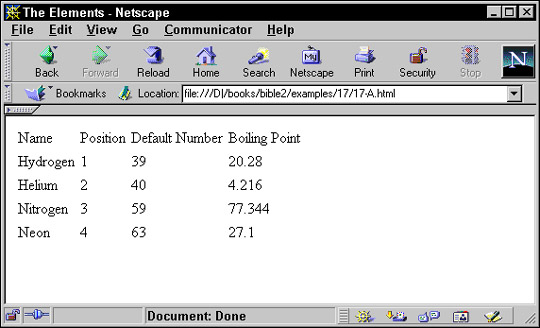
Figure 17-5: Atoms with boiling points less than or equal to nitrogen's
By default, with no value attribute, xsl:number counts siblings of the source node with the same type. For instance, if the ATOMIC_NUMBER elements were numbered instead of ATOM elements, none would have a number higher than 1 because an ATOM never has more than one ATOMIC_NUMBER child. Although the document contains more than one ATOMIC_NUMBER element, these are not siblings.
Setting the level attribute of xsl:number to any counts all of the elements of the same kind as the current node in the document. This includes not just the ones in the current
node list, but all nodes of the same type. Even if you select only the atomic numbers of the gases, for example, the solids
and liquids would still count, even if they weren't output. Consider these rules:
<xsl:template match="ATOM">
  <tr><xsl:apply-templates select="NAME"/></tr>
</xsl:template>
<xsl:template match="NAME">
  <td><xsl:number level="any"/></td>
  <td><xsl:value-of select="."/></td>
</xsl:template>
Because level is set to any, these templates produce output like this that doesn't start from 1 with each new NAME element:
<tr>
<td>1</td><td>Hydrogen</td>
</tr>
<tr>
<td>2</td><td>Helium</td>
</tr>
If you remove the level attribute or set it to its default value of single, then the output looks like this:
<tr>
<td>1</td><td>Hydrogen</td>
</tr>
<tr>
<td>1</td><td>Helium</td>
</tr>
A slightly less useful option sets the level attribute of xsl:number to multiple to specify that both the siblings of the current node and its ancestors (but not their children that aren't siblings of the
current node) should be counted.
By default, with no value attribute, only elements of the same type as the element of the current node get counted. However, you can set the count attribute of xsl:number to an expression that specifies what to count. For instance, this rule matches all the child elements of an ATOM. It places a number in front of each one that represents its position among all the children of that ATOM.
<xsl:template match="ATOM/*">
  <td><xsl:number count="*"/></td>
  <td><xsl:value-of select="."/></td>
</xsl:template>
The output from this template looks like this:
    <td>1</td><td>Hydrogen</td>
    <td>2</td><td>H</td>
    <td>3</td><td>1</td>
    <td>4</td><td>1.00794</td>
    <td>5</td><td>20.28</td>
    <td>6</td><td>13.81</td>
    <td>7</td><td>
      0.0000899
    </td>
    <td>1</td><td>Helium</td>
    <td>2</td><td>He</td>
    <td>3</td><td>2</td>
    <td>4</td><td>4.0026</td>
    <td>5</td><td>4.216</td>
    <td>6</td><td>0.95</td>
    <td>7</td><td>
      0.0001785
    </td>
The from attribute contains an XPath expression that specifies which element the counting begins with in the input tree. However,
the counting still begins from 1, not 2 or 10 or some other number. The from attribute only changes which element is considered to be the first element. This attribute is only considered when level="any". Other times it has no effect.
Until now, I've implicitly assumed that numbers looked like 1, 2, 3, and so on; that is, a European numeral starting from
1 and counting by 1. However, that's not the only possibility. For instance, the page numbers in the preface and other front
matter of books often appear in small Roman numerals like i, ii, iii, iv, and so on. And different countries use different
conventions to group the digits, separate the integer and fractional parts of a real number, and represent the symbols for
the various digits. These are all adjustable through four attributes of xsl:number:
formatletter-valuegrouping-separatorgrouping-sizeYou can adjust the numbering style used by xsl:number using the format attribute. This attribute generally has one of the following values:
i: the lowercase Roman numerals i, ii, iii, iv, v, vi, . . .
I: the uppercase Roman numerals I, II, III, IV, V, VI, . . .
a: the lowercase letters a, b, c, d, e, f, . . .
A: the uppercase letters A, B, C, D, E, F, . . .
For example, this rule numbers the atoms with capital Roman numerals:
<xsl:template match="ATOM">
  <P>
    <xsl:number value="position()" format="I"/>
    <xsl:value-of select="."/>
  </P>
</xsl:template>
You can specify decimal numbering with leading zeroes by including the number of leading zeroes you want in the format attribute. For instance, setting format="01", produces the sequence 01, 02, 03, 04, 05, 06, 07, 08, 09, 10, 11, 12, . . . . You might find this useful when lining numbers
up in columns.
The letter-value attribute distinguishes between letters interpreted as numbers and letters interpreted as letters. For instance, if you want
to use format="I" to start the sequence I, J, K, L, M, N, . . . instead of I, II, III, IV, V, VI, . . . you would set the letter-value attribute to the keyword alphabetic. The keyword traditional specifies a numeric sequence. For example,
<xsl:template match="ATOM">
  <P>
   <xsl:number value="position()"
               format="I" letter-value="alphabetic"/>
   <xsl:value-of select="."/>
  </P>
</xsl:template>
In the United States, we tend to write large numbers with commas grouping every three digits; for example, 4,567,302,000. However, in many languages and countries, a period or a space separates the groups instead; for instance, 4.567.302.000 or 4 567 302 000. Furthermore, in some countries it's customary to group large numbers every four digits instead of every three; for example, 4,5673,0000. If you're dealing with very long lists that may contain a thousand or more items, you need to worry about these issues.
The grouping-separator attribute specifies the grouping separator used between groups of digits. The grouping-size attribute specifies the number of digits used in a group. Generally, you'd make these attributes contingent on the language.
For example,
<xsl:number grouping-separator=" " grouping-size="3"/>
The xsl:sort element sorts the output elements into a different order than they appear in the input. An xsl:sort element appears as a child of an xsl:apply-templates element or xsl:for-each element. The select attribute of the xsl:sort element defines the key used to sort the element's output by xsl:apply-templates or xsl:for-each.
By default, sorting is performed in alphabetical order of the keys. If more than one xsl:sort element is present in a given xsl:apply-templates or xsl:for-each element, then the elements are sorted first by the first key, then by the second key, and so on. If any elements still compare
equally, they are output in the order they appear in the source document.
For example, suppose you have a file full of ATOM elements arranged alphabetically. To sort by atomic number, you can use the style sheet in Listing 17-19.
Listing 17-19: An XSLT style sheet that sorts by atomic number
<?xml version="1.0"?>
<xsl:stylesheet version="1.0"
  xmlns:xsl="http://www.w3.org/1999/XSL/Transform">
    <xsl:template match="PERIODIC_TABLE">
      <html>
        <head>
          <title>Atomic Number vs. Atomic Weight</title>
        </head>
        <body>
          <h1>Atomic Number vs. Atomic Weight</h1>
          <table>
            <th>Element</th>
            <th>Atomic Number</th>
            <th>Atomic Weight</th>
            <xsl:apply-templates>
              <xsl:sort select="ATOMIC_NUMBER"/>
            </xsl:apply-templates>
          </table>
        </body>
      </html>
    </xsl:template>
    <xsl:template match="ATOM">
      <tr>
        <td><xsl:apply-templates select="NAME"/></td>
        <td><xsl:apply-templates select="ATOMIC_NUMBER"/></td>
        <td><xsl:apply-templates select="ATOMIC_WEIGHT"/></td>
      </tr>
    </xsl:template>
</xsl:stylesheet>
Figure 17-6 shows the limits of alphabetical sorting. Hydrogen, atomic number 1, is the first element. However, the second element is not helium, atomic number 2, but rather neon, atomic number 10. Although 10 sorts after 9 numerically, alphabetically 10 falls before 2.
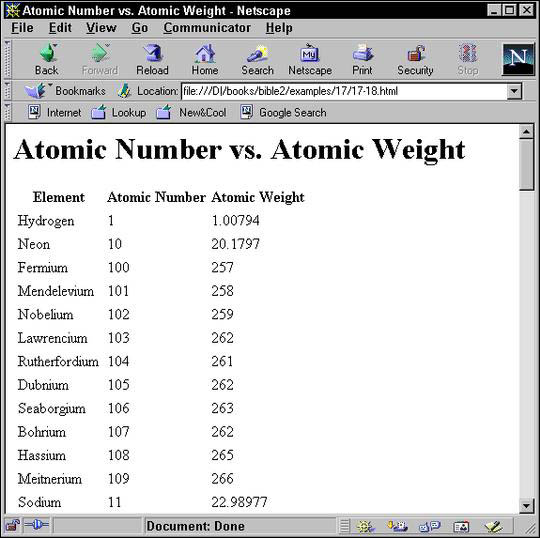
Figure 17-6: Atoms alphabetically sorted by atomic number
You can, however, adjust the order of the sort by setting the optional data-type attribute to the value number. For example,
<xsl:sort data-type="number" select="ATOMIC_NUMBER"/>
Figure 17-7 shows the elements sorted properly.
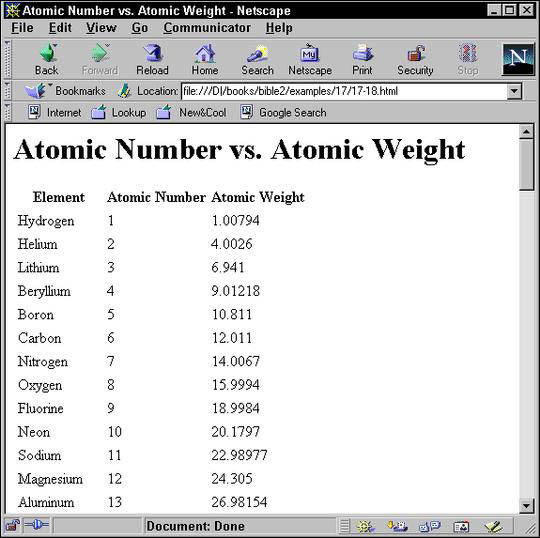
Figure 17-7: Atoms numerically sorted by atomic number
You can change the order of the sort from the default ascending order to descending by setting the order attribute to descending like this:
<xsl:sort order="descending"
          data-type="number"
          select="ATOMIC_NUMBER"/>
This sorts the elements from the largest atomic number to the smallest so that hydrogen now appears last in the list.
Alphabetical sorting naturally depends on the alphabet. The lang attribute can set the language of the keys. The value of this attribute should be an ISO 639 language code such as en for English. However, processors are not required to know how to sort in all the different languages that might be encountered
in XML. While English sorting is fairly straight-forward, many other languages require much more complicated algorithms. Indeed
a few languages actually have multiple standard ways of sorting based on different criteria. The lang attribute is ignored if data-type is number.
Cross-Reference
These are the same values supported by the xml:lang attribute discussed in Chapter 11.
Finally, you can set the case-order attribute to one of the two values upper-first or lower-first to specify whether uppercase letters sort before lowercase letters or vice versa. The default depends on the language.
Sometimes you want to include the same content from the source document in the output document multiple times. That's easy to do simply by applying templates multiple times, once in each place where you want the data to appear. However, suppose you want the data to be formatted differently in different locations? That's a little trickier.
For example, suppose you want the output of processing the periodic table to be a series of 100 links to more detailed descriptions of the individual atoms. In this case, the output document would start like this:
<UL>
<LI><A HREF="#Ac">Actinium</A></LI>
<LI><A HREF="#Al">Aluminum</A></LI>
<LI><A HREF="#Am">Americium</A></LI>
<LI><A HREF="#Sb">Antimony</A></LI>
<LI><A HREF="#Ar">Argon</A></LI>
. . .
Later in the document, the actual atom descriptions would appear, formatted like this:
<H3>
<A NAME="H">Hydrogen</A>
</H3>
<P>
    Hydrogen
    H
    1
    1.00794
    20.28
    13.81
      0.0000899
  </P>
This sort of application is common anytime you automatically generate a table of contents or an index. The NAME of the atom must be formatted differently in the table of contents than in the body of the document. You need two different
rules that both apply to the ATOM element at different places in the document. The solution is to give each of the different rules a mode attribute. Then you can choose which template to apply by setting the mode attribute of the xsl:apply-templates element. Listing 17-20 demonstrates.
Listing 17-20: An XSLT style sheet that uses modes to format the same data differently in two different places
<?xml version="1.0"?>
<xsl:stylesheet version="1.0"
  xmlns:xsl="http://www.w3.org/1999/XSL/Transform">
  <xsl:template match="/PERIODIC_TABLE">
    <HTML>
      <HEAD><TITLE>The Elements</TITLE></HEAD>
      <BODY>
        <H2>Table of Contents</H2>
        <UL>
          <xsl:apply-templates select="ATOM" mode="toc"/>
        </UL>
        <H2>The Elements</H2>
        <xsl:apply-templates select="ATOM" mode="full"/>
      </BODY>
    </HTML>
  </xsl:template>
  <xsl:template match="ATOM" mode="toc">
    <LI><A>
      <xsl:attribute name="HREF">#<xsl:value-of
        select="SYMBOL"/></xsl:attribute>
      <xsl:value-of select="NAME"/>
    </A></LI>
  </xsl:template>
  <xsl:template match="ATOM" mode="full">
    <H3><A>
      <xsl:attribute name="NAME">
        <xsl:value-of select="SYMBOL"/>
      </xsl:attribute>
      <xsl:value-of select="NAME"/>
    </A></H3>
      <P>
        <xsl:value-of select="."/>
      </P>
  </xsl:template>
</xsl:stylesheet>
The default template rule for nodes preserves modes. That is, for every mode n you declare in your style sheet, the XSLT processor adds one template rule that applies specifically to that mode and looks like this:
<xsl:template match="*|/" mode="n">
  <xsl:apply-templates mode="n"/>
</xsl:template>
As usual, you are free to override this default rule with one of your own design.
Named constants help clean up code. They can replace commonly used boilerplate text with a simple name and reference. They can also make it easy to adjust boilerplate text that appears in multiple locations by simply changing the constant definition.
The xsl:variable element defines a named string for use elsewhere in the style sheet via an attribute value template. It has a single attribute,
name, which provides a name by which the variable can be referred to. The contents of the xsl:variable element provide the replacement text. For example, this xsl:variable element defines a variable with the name copy01 and the value Copyright 2001 Elliotte Rusty Harold:
<xsl:variable name="copy01">
  Copyright 2001 Elliotte Rusty Harold
</xsl:variable>
To access the value of this variable, you prefix a dollar sign to the name of the variable. To insert this in an attribute, use an attribute value template. For example:
<BLOCK COPYRIGHT="{$copy01}">
</BLOCK>
You can use xsl:value-of to insert the variable's replacement text into the output document as text:
<xsl:value-of select="$copy01"/>
The contents of the xsl:variable can contain markup including other XSLT instructions. This means that you can calculate the value of a variable based on
other information, including the value of other variables. However, a variable may not refer to itself recursively, either
directly or indirectly. For instance, the following example is in error:
<xsl:variable name="GNU">
  <xsl:value-of select="$GNU"/>'s not Unix
</xsl:variable>
Similarly, two variables may not refer to each other in a circular fashion like this:
<xsl:variable name="Thing1">
  Thing1 loves <xsl:value-of select="$Thing2"/>
</xsl:variable>
<xsl:variable name="Thing2">
  Thing2 loves <xsl:value-of select="$Thing1"/>
</xsl:variable>
xsl:variable elements can either be top-level children of the xsl:stylesheet root element or they can be included inside template rules. A variable present at the top level of a style sheet can be accessed
anywhere in the style sheet. It’s a global variable. By contrast, a variable that’s declared inside a template rule is only
accessible by its following sibling elements and their descendants (the scope of the variable). It’s a local variable. Local variables override global variables with the same name. Local variables can
also override other local variables. In the event of a conflict between two variables with the same name, the closest local
variable with the same name is used.
Variables are limited to basic text and markup. XSLT provides a more powerful macro facility that can wrap standard markup and text around changing data. For example, suppose you want an atom's atomic number, atomic weight, and other key values formatted as a table cell in small, bold Times in blue. In other words, you want the output to look like this:
<td>
  <font face="Times, serif" color="blue" size="2">
    <b>52</b>
  </font>
</td>
You can certainly include all that in a template rule like this:
<xsl:template match="ATOMIC_NUMBER">
  <td>
    <font face="Times, serif" color="blue" size="2">
      <b>
        <xsl:value-of select="."/>
      </b>
    </font>
  </td>
</xsl:template>
This markup can be repeated inside other template rules. When the detailed markup grows more complex, and when it appears in several different places in a style sheet, you may elect to turn it into a named template. Named templates resemble variables. However, they enable you to include data from the place where the template is applied, rather than merely inserting fixed text.
The xsl:template element can have a name attribute by which it can be explicitly invoked, even when it isn't applied indirectly. For example, this shows a sample
named template for the above pattern:
<xsl:template name="ATOM_CELL">
  <td>
    <font face="Times, serif" color="blue" size="2">
      <b>
        <xsl:value-of select="."/>
      </b>
    </font>
  </td>
</xsl:template>
The <xsl:value-of select="."/> element in the middle of the named template will be replaced by the contents of the current node from which this template
was called.
The xsl:call-template element appears in the contents of a template rule. It has a required name argument that names the template it will call. When processed, the xsl:call-template element is replaced by the contents of the xsl:template element it names. For example, you can now rewrite the ATOMIC_NUMBER rule like this by using the xsl:call-template element to call the ATOM_CELL named template:
<xsl:template match="ATOMIC_NUMBER">
  <xsl:call-template name="ATOM_CELL"/>
</xsl:template>
This fairly simple example only saves a few lines of code, but the more complicated the template, and the more times it's reused, the greater the reduction in complexity of the style sheet. Named templates also have the advantage, like variables, of factoring out common patterns in the style sheet so that you can edit them as one. For instance, if you decide to change the color of atomic number, atomic weight, and other key values from blue to red, you only need to change it once in the named template. You do not have to change it in each separate template rule. This facilitates greater consistency of style.
Each separate invocation of a template can pass parameters to the template to customize its output. This is done the same
way for named templates and unnamed templates. In the xsl:template element, the parameters are represented as xsl:param child elements. In xsl:call-template or xsl:apply-templates elements, parameters are represented as xsl:with-param child elements.
For example, suppose you want to also include a link to a particular file for each atom cell. The output should look something like this:
<td>
  <font face="Times, serif" color="blue" size="2">
    <b>
      <a href="atomic_number.html">52</a>
    </b>
  </font>
</td>
The trick is that the value of the href attribute has to be passed in from the point where the template is invoked because it changes for each separate invocation
of the template. For example, atomic weights will have to be formatted like this:
<td>
  <font face="Times, serif" color="blue" size="2">
    <b>
      <a href="atomic_weight.html">4.0026</a>
    </b>
  </font>
</td>
The template that supports this looks like this:
<xsl:template name="ATOM_CELL">
  <xsl:param name="file">index.html</xsl:param>
  <td>
    <font face="Times, serif" color="blue" size="2">
      <b>
        <a href="{$file}"><xsl:value-of select="."/></a>
      </b>
    </font>
  </td>
</xsl:template>
The name attribute of the xsl:param element gives the parameter a name (important if there are multiple arguments) and the contents of the xsl:param element supplies a default value for this parameter to be used if the invocation doesn't provide a value. (This can also
be given as a string expression by using a select attribute.)
When this template is called, an xsl:with-param child of the xsl:call-template element provides the value of the parameter using its name attribute to identify the parameter and its contents to provide a value for the parameter. For example:
<xsl:template match="ATOMIC_NUMBER">
  <xsl:call-template name="ATOM_CELL">
    <xsl:with-param
                name="file">atomic_number.html</xsl:with-param>
  </xsl:call-template>
</xsl:template>
Again, this is a simple example. However, much more complex named templates exist. For instance, you could define header and footer templates for pages on a Web site for importing by many different style sheets, each of which would only have to change a few parameters for the name of the page author, the title of the page, and the copyright date.
You may have noticed that most of the examples of output have been formatted a little strangely. The reason the examples appeared strange is that the source document needed to break long elements across multiple lines to fit between the margins of this book. Unfortunately, the extra white space added to the input document carried over into the output document. For a computer, the details of insignificant white space aren't important, but for a person they can be distracting.
The default behavior for text nodes read from the input document, such as the content of an ATOMIC_NUMBER or DENSITY element, is to preserve all white space. A typical DENSITY element looks like this:
    <DENSITY UNITS="grams/cubic centimeter">
      <!-- At 300K, 1 atm -->
      0.0000899
    </DENSITY>
When its value is taken the leading and trailing white space is included, like this, even though it's really only there to help fit on this printed page and isn't at all significant:
0.0000899
You can use the normalize-space() function to strip the leading and trailing white space from this or any other string. For example, instead of writing <xsl:value-of select="DENSITY"/>, you would write <xsl:value-of select="normalize-space(DENSITY)"/>.
You can also automatically delete white-space only nodes in the input document by using xsl:strip-space. The elements attribute of this top-level element contains a list of elements from which text nodes that contain nothing but white space
should be deleted. For example, this element says that nodes containing only white space should be stripped from DENSITY, NAME, SYMBOL, and BOILING_POINT elements:
<xsl:strip-space elements="DENSITY NAME SYMBOL BOILING_POINT"/>
You can strip space-only nodes in all elements by using the * wildcard, like this:
<xsl:strip-space elements="*"/>
There's also an xsl:preserve-space element with a similar syntax but opposite meaning. However, since preserving space is the default, this element isn’t much
used. Its main purpose is to override xsl:strip-space elements imported from other style sheets or to specify a few elements where space is preserved when the default has been
reset to stripping by <xsl:strip-space elements="*"/>.
White space only text nodes in the style sheet, as opposed to the input document, are another matter. They are stripped by
default. If you want to preserve one, you attach an xml:space attribute with the value preserve to its parent element or to another one of its ancestors.
Cross-Reference
The xml:space attribute was discussed in Chapter 11.
Sometimes the easiest way to include significant white space in a style sheet is to wrap it in an xsl:text element. Space inside an xsl:text element is treated literally and never stripped.
XSLT provides two elements that allow you to change the output based on the input. The xsl:if element either does or does not output a given fragment of XML depending on what patterns are present in the input. The xsl:choose element picks one of several possible XML fragments, depending on what patterns are present in the input. Most of what you
can do with xsl:if and xsl:choose can also be done by a suitable application of templates. However, sometimes the solution with xsl:if or xsl:choose is simpler and more obvious.
The xsl:if element provides a simple facility for changing the output based on a pattern. The test attribute of xsl:if contains an expression that evaluates to a boolean. If the expression is true, the contents of the xsl:if element are output. Otherwise, they're not. For example, this template writes out the names of all ATOM elements. A comma and a space is added after all except the last element in the list.
<xsl:template match="ATOM">
  <xsl:value-of select="NAME"/>
  <xsl:if test="position()!=last()">, </xsl:if>
</xsl:template>
This ensures that the list looks like "Hydrogen, Helium" and not "Hydrogen, Helium, ".
There are no xsl:else or xsl:else-if elements. The xsl:choose element provides this functionality.
The xsl:choose element selects one of several possible outputs depending on several possible conditions. Each condition and its associated
output template is provided by an xsl:when child element. The test attribute of the xsl:when element is an XPath expression with a boolean value. If multiple conditions are true, only the first true one is instantiated.
If none of the xsl:when elements are true, the xsl:otherwise child element is instantiated. For example, this rule changes the color of the output based on whether the STATE attribute of the ATOM element is SOLID, LIQUID, or GAS:
<xsl:template match="ATOM">
  <xsl:choose>
    <xsl:when test="@STATE='SOLID'">
      <P style="color: black">
        <xsl:value-of select="."/>
      </P>
    </xsl:when>
    <xsl:when test="@STATE='LIQUID'">
      <P style="color: blue">
        <xsl:value-of select="."/>
      </P>
    </xsl:when>
    <xsl:when test="@STATE='GAS'">
      <P style="color: red">
        <xsl:value-of select="."/>
      </P>
    </xsl:when>
    <xsl:otherwise>
      <P style="color: green">
        <xsl:value-of select="."/>
      </P>
    </xsl:otherwise>
  </xsl:choose>
</xsl:template>
A single XML document may use many different markup vocabularies described in many different DTDs. You may wish to use different
standard style sheets for those different vocabularies. However, you'll also want style rules for particular documents as
well. The xsl:import and xsl:include elements enable you to merge multiple style sheets so that you can organize and reuse style sheets for different vocabularies
and purposes.
The xsl:import element is a top-level element whose href attribute provides the URI of a style sheet to import. All xsl:import elements must appear before any other top-level element in the xsl:stylesheet root element. For example, these xsl:import elements import the style sheets genealogy.xsl and standards.xsl.
<xsl:stylesheet version="1.0"
  xmlns:xsl="http://www.w3.org/1999/XSL/Transform">
  <xsl:import href="genealogy.xsl"/>
  <xsl:import href="standards.xsl"/>
  <!-- other child elements follow -->
</xsl:stylesheet>
Rules in the imported style sheets may conflict with rules in the importing style sheet. If so, rules in the importing style sheet take precedence. If two rules in different imported style sheets conflict, then the rule in the last style sheet imported (standards.xsl above) takes precedence.
The xsl:apply-imports element is a slight variant of xsl:apply-templates that only uses imported rules. It does not use any rules from the importing style sheet. This allows access to imported rules
that would otherwise be overridden by rules in the importing style sheet. Other than the name, it has identical syntax to
xsl:apply-templates. The only behavioral difference is that it only matches template rules in imported style sheets.
The xsl:include element is a top-level element that copies another style sheet into the current style sheet at the point where it occurs.
(More precisely, it copies the contents of the xsl-stylesheet or xsl:transform element in the remote document into the current document.) Its href attribute provides the URI of the style sheet to include. An xsl:include element can occur anywhere at the top level after the last xsl:import element.
Unlike rules included by xsl:import elements, rules included by xsl:include elements have the same precedence in the including style sheet that they would have if they were copied and pasted from one
style sheet to the other. As far as the XSLT processor is concerned, there is no difference between an included rule and a
rule that's physically present.
You can directly include an XSLT style sheet in the XML document it applies to. I don't recommend this in practice, and browsers
and XSLT processors are not required to support it. Nonetheless, a few do. To use this, the xsl:stylesheet element must appear as a child of the document element, rather than as a root element itself. It would have an id attribute giving it a unique name, and this id attribute would appear as the value of the href attribute in the xml-stylesheet processing instruction, following the fragment identifier separator #. Listing 17-21 demonstrates.
Listing 17-21: An XSLT style sheet embedded in an XML document
<?xml version="1.0"?>
<?xml-stylesheet type="text/xml" href="#mystyle"?>
<PERIODIC_TABLE>
  <xsl:stylesheet version="1.0"
    xmlns:xsl="http://www.w3.org/1999/XSL/Transform"
    id="mystyle">
    <xsl:template match="/">
      <html>
        <xsl:apply-templates/>
      </html>
    </xsl:template>
    <xsl:template match="PERIODIC_TABLE">
      <xsl:apply-templates/>
    </xsl:template>
    <xsl:template match="ATOM">
      <P>
        <xsl:value-of select="."/>
      </P>
    </xsl:template>
    <!--Don't display the style sheet itself
       or its descendants-->
    <xsl:template match="xsl:stylesheet"/>
  </xsl:stylesheet>
  <ATOM>
    <NAME>Actinium</NAME>
    <ATOMIC_WEIGHT>227</ATOMIC_WEIGHT>
    <ATOMIC_NUMBER>89</ATOMIC_NUMBER>
    <OXIDATION_STATES>3</OXIDATION_STATES>
    <BOILING_POINT UNITS="Kelvin">3470</BOILING_POINT>
    <MELTING_POINT UNITS="Kelvin">1324</MELTING_POINT>
    <SYMBOL>Ac</SYMBOL>
    <DENSITY UNITS="grams/cubic centimeter"><!-- At 300K -->
      10.07
    </DENSITY>
    <ELECTRONEGATIVITY>1.1</ELECTRONEGATIVITY>
    <ATOMIC_RADIUS UNITS="Angstroms">1.88</ATOMIC_RADIUS>
  </ATOM>
</PERIODIC_TABLE>
Most of the examples in this chapter have focused on transforming XML into well-formed HTML. However, most XSLT processors actually support three different output methods:
The XSLT processor behaves differently depending on which of these output methods it uses. The XML format is the default and
in many ways the simplest. The output is mostly exactly what you request in your style sheet. Because well-formed XML does
not permit raw less-than signs and ampersands, if you use a character reference such as < or the entity reference < to insert the < character, the formatter will output < or perhaps <. If you use a character reference such as & or the entity reference & to insert the & character, the formatter will insert & or perhaps &. There are ways to disable this escaping, though, as you'll see later.
The HTML output method is designed to output standard HTML 4.0. This is not the well-formed HTML used in this book, but rather
traditional HTML in which empty tags look like <HR> and <IMG> instead of <HR/> and <IMG/>, processing instructions are terminated with a > instead of ?>, and < signs used in JavaScript are not converted to <. This makes it much easier to output HTML that works across many browsers and platforms without odd effects such as double
lines where a single line is expected or other detritus caused by forcing HTML into the XML mold. The HTML output method is
automatically selected when the formatter notices that the root output element is html, HTML, HtMl, or any other combination of case that still spells Hypertext Markup Language.
The final output method is pure text. The text output method operates by first forming a full result tree as per the XML output
method, but then only outputting the string value of that tree. This is useful for transforming to non-XML formats such as
RTF or TeX. The primary benefit of the text output format is that less than signs are not converted to < or < and ampersands are not converted to & or &. This allows you to output effectively arbitrary text.
By default an XSLT processor will use the XML output method, unless it recognizes the output root element as HTML, in which case it uses the HTML output method. You can change this by using a top-level xsl:output element. The method attribute of the xsl:output element specifies which output method to use and normally has one of these three values:
xmlhtml
textFormatting engines may support other values as well, but so far none do. For example, to specify that you want pure well-formed
HTML as output, with all the empty tags properly indicated, all less than signs escaped, and so forth, you would use this
xsl:output element at the top level of your style sheet:
<xsl:output method="xml"/>
To indicate that you want regular HTML output even though you aren't using an html root element, you'd put this xsl:output element at the top level of your style sheet:
<xsl:output method="html"/>
The xsl:output element also has a number of other allowed attributes that modify how XML is output. These allow you to change the prolog
of the document, how the output is indented with insignificant white space, and which elements use CDATA sections rather than escaping < and & characters.
Four attributes of xsl:output format the XML declaration used in your document. This assumes the output method is xml. These attributes are:
omit-xml-declarationversionencodingstandaloneThe omit-xml-declaration attribute has the value yes or no. If yes, then an XML declaration is not included in the output document. If no, then it is. For example, to insert a very basic <?xml version="1.0"?> XML declaration in the output document you would use this xsl:output element at the top level of your style sheet:
<xsl:output method="xml" omit-xml-declaration="no"/>
You could also include it as two separate xsl:output elements like this:
<xsl:output method="xml"/>
<xsl:output omit-xml-declaration="no"/>
The default value of the version attribute of the XML declaration is 1.0. Currently, that's the only value allowed. If at some point in the future that changes,
then the version attribute of xsl:output will allow you to change the version used in the XML declaration. For example,
<xsl:output version="1.1"/>
You can set the standalone attribute of the XML declaration to the value yes or no using the standalone attribute of the xsl:output element. For example, this xsl:output element would insert the XML declaration <?xml version="1.0" standalone="yes"?>:
<xsl:output method="xml"
            omit-xml-declaration="no" standalone="yes"/>
The final possible piece of an XML declaration is the encoding declaration. As you probably guessed this can be set with the encoding attribute of the xsl:output element. The value can be any legal encoding name registered with the Internet Assigned Numbers Authority as discussed in
Chapter 7. For example, to insert the XML declaration <?xml version="1.0" encoding="ISO-8859-1"?>, you'd use this xsl:output element:
<xsl:output method="xml"
          omit-xml-declaration="no" encoding="ISO-8859-1"/>
This also changes the encoding the XSLT processor uses for the output document from its default UTF-8. However, not all processors support all possible encodings. Those written in Java are likely to support the most encodings because Java's rich class library makes it almost trivial to support several dozen popular encodings.
XSLT does not provide any elements for building an internal DTD subset for the output document with <!ELEMENT>, <!ATTLIST>, <!ENTITY>, and <!NOTATION> declarations. However, it does provide two attributes of the xsl:output element you can use to include a DOCTYPE declaration that points to an external DTD. These are doctype-system and doctype-public. The first inserts a SYSTEM identifier for the DTD; the second a PUBLIC identifier. For example, suppose you want this DOCTYPE declaration in your output document:
<!DOCTYPE PERIODIC_TABLE SYSTEM "chemistry.dtd">
Then you would use this xsl:output element at the top level of your style sheet:
<xsl:output doctype-system="chemistry.dtd"/>
The XSLT processor determines the proper root element for the document type declaration by looking at the root element of the output tree. Using a full URL instead of a relative URL is equally easy:
<xsl:output
  doctype-system="http://www.mysite.com/chemistry.dtd"/>
On the other hand, suppose you want this DOCTYPE declaration in your output document:
<!DOCTYPE html PUBLIC "-//W3C//DTD HTML 4.0 Transitional//EN"
         "http://www.w3.org/TR/REC-html40/loose.dtd">
Then you would use both doctype-system and doctype-public attributes so your DOCTYPE declaration will have both a PUBLIC and a SYSTEM identifier. For example,
<xsl:output
  doctype-system="http://www.w3.org/TR/REC-html40/loose.dtd"
  doctype-public="-//W3C//DTD HTML 4.0 Transitional//EN"/>
The indentation of most of the output examples in this chapter has been more than a little flaky. It's certainly not as neat
as the carefully hand-coded indentation of the input documents. However, if white space isn't particularly significant in
your output document, you can change this and ask the formatter for "pretty printed" XML with the nesting of different elements
indicated by the indentation. This is accomplished by the indent attribute of the xsl:output element. If this attribute has the value yes (the default is no), then the processor is allowed (but not required) to insert (but not remove) extra white space into the output to try to
"pretty print" the output. This may include indentation and line breaks. For example,
<xsl:output indent="yes"/>
You cannot, however, specify how much you want each level indented (for example, by two spaces or one tab). That's up to the
formatter. Together, the xsl:strip-space and the indent attribute of the xsl:output element allow you to produce output that's almost as attractive as the most painstakingly hand-crafted XML.
Standard XSLT does not allow you to insert CDATA sections at arbitrary locations in XML documents produced by XSL transformations.
However, you can specify that the text contents of a particular element be placed in a CDATA section. In this case the < and & symbols are not encoded as < and & as they would normally be. To do this, place the name of the element whose text contents should be wrapped in CDATA delimiters
in the cdata-section-elements attribute of the xsl:output element. For example, this xsl:output element says that the contents of the SCRIPT element should be wrapped in a CDATA section:
<xsl:output cdata-section-elements="SCRIPT"/>
You can enclose multiple names of elements whose text contents should be wrapped in CDATA delimiters in one cdata-section-elements attribute simply by separating the names with white space. For example, this xsl:output element says that the contents of both the SCRIPT and CODE elements should be wrapped in a CDATA section:
<xsl:output cdata-section-elements="SCRIPT CODE"/>
Alternately, you can just use multiple xsl:output elements, each naming one element. For example:
<xsl:output cdata-section-elements="SCRIPT"/>
<xsl:output cdata-section-elements="CODE"/>
One final xsl:output attribute specifies the MIME media type of the output document. This is media-type. Mostly this will have the value text/xml, but it might be text/html for the HTML output method, text/plain for the text output method, or even something else such as text/rtf. You should not specify a charset parameter for the media type. The formatting engine should determine this from the encoding attribute of the xsl:output element. For example, this xsl:output element specifies that the output encoding uses the text/rtf MIME type:
<xsl:output media-type="text/rtf"/>
Depending on external context, this may determine the filename extension, the icon of the file, how an HTTP server handles the file, or something else. Then again, it might have no effect at all. The XSLT processor might ignore this request and output the same byte stream or XML tree regardless of media type. This is something that's important to the environment in which the XML document exists, but not so important to the XML document itself.
In this chapter, you learned about XSL transformations. In particular, you learned that:
xsl:template element with a match attribute. Nodes in the input tree are compared against the patterns of the match attributes of the different template elements. When a match is found, the contents of the template are output.
xsl:value-of element.
xsl:apply-templates element and the xsl:for each element.
match attribute of the xsl:template element is a match pattern specifying which nodes the template matches.
select attribute of xsl:apply-templates, xsl:value-of, xsl:for-each, xsl:copy-of, xsl:variable, xsl:param, xsl:with-param, and xsl:sort elements.
xsl:element, xsl:attribute, xsl:processing-instruction, xsl:comment, and xsl:text elements output elements, attributes, processing instructions, comments, and text calculated from data in the input document.
xsl:attribute-set element defines a common group of attributes that can be applied to multiple elements in different templates with the xsl:use-attribute-sets.
xsl:copy element copies the current node from the input into the output.
xsl:number element inserts the number specified by its value attribute into the output using a specified number format given by the format attribute.
xsl:sort element can reorder the input nodes before copying them to the output.
xsl:variable element defines named constants that can clarify your code.
xsl:strip-space element or xml:space attribute says otherwise.
xsl:if element produces output if, and only if, its test attribute is true.
xsl:choose element outputs the template of the first one of its xsl:when children whose test attribute is true, or the template of its xsl:otherwise element if no xsl:when element has a true test attribute.
xsl:import and xsl:include elements merge rules from different style sheets.
xsl:stylesheet element allows you to include a style sheet directly in the document it applies to.
xsl:output element allow you to specify the output document's format, XML declaration, document type declaration, indentation, encoding and MIME type.
The next chapter takes up the second half of XSL: the formatting objects vocabulary. Formatting objects is an extremely powerful way of specifying the precise layout you want your pages to have. XSL transformations are used to transform an XML document into an XSL formatting object document.